
Localized Tab Menu
You can localize labels on Median's bottom Tab Menu using the Dynamic Tab Menu feature. This enables a multilingual user experience by adapting tab labels based on the user's device language settings.
The following implementation shows how to detect the user's language, apply a translation dictionary, and render the bottom tab bar in English, French, Spanish, German, or Italian.
Implementation Guide
Developer DemoDisplay our demo page in your app to test during development https://median.dev/tab-bar-navigation/localized-nav
JavaScript Implementation
// Get the user's language
let userLanguage = navigator.language || navigator.userLanguage;
let languageCode = userLanguage.split("-")[0];

// Function to localize the tab items
function localizeTabItems(tabItems) {
  // Define translations for the labels
  const translations = {
    en: {
      "Tab 1": "Tab 1",
      "Tab 2": "Tab 2",
      "Tab 3": "Tab 3",
    },
    fr: {
      "Tab 1": "Onglet 1",
      "Tab 2": "Onglet 2",
      "Tab 3": "Onglet 3",
    },
    es: {
      "Tab 1": "Pestaña 1",
      "Tab 2": "Pestaña 2",
      "Tab 3": "Pestaña 3",
    },
    de: {
      "Tab 1": "Register 1",
      "Tab 2": "Register 2",
      "Tab 3": "Register 3",
    },
    it: {
      "Tab 1": "Scheda 1",
      "Tab 2": "Scheda 2",
      "Tab 3": "Scheda 3",
    },
  };

  // Get the user's language
  const userLanguage = navigator.language || navigator.userLanguage;
  const languageCode = userLanguage.split("-")[0];

  // Check if the translations exist for the user's language
  const userTranslations = translations[languageCode] || translations["en"];

  // Update the labels in the tabItems array
  return tabItems.map((item) => ({
    ...item,
    label: userTranslations[item.label] || item.label,
  }));
}

const tabItems = [
  {
    icon: "fas fa-cloud",
    label: "Tab 1",
    url: "javascript:alert('You selected tab 1')",
  },
  {
    icon: "fas fa-globe",
    label: "Tab 2",
    url: "javascript:alert('You selected tab 2')",
  },
  {
    icon: "fas fa-users",
    label: "Tab 3",
    url: "javascript:alert('You selected tab 3')",
  },
];

// Localize tab bar items
const localizedTabItems = localizeTabItems(tabItems);

// Render bottom tab bar
function median_library_ready() {
  median.tabNavigation.setTabs({ enabled: true, items: localizedTabItems });
}
Tab Bar Localization Demo
This animated demo shows how the tab labels dynamically change when the user's device language is changed from English to Spanish.
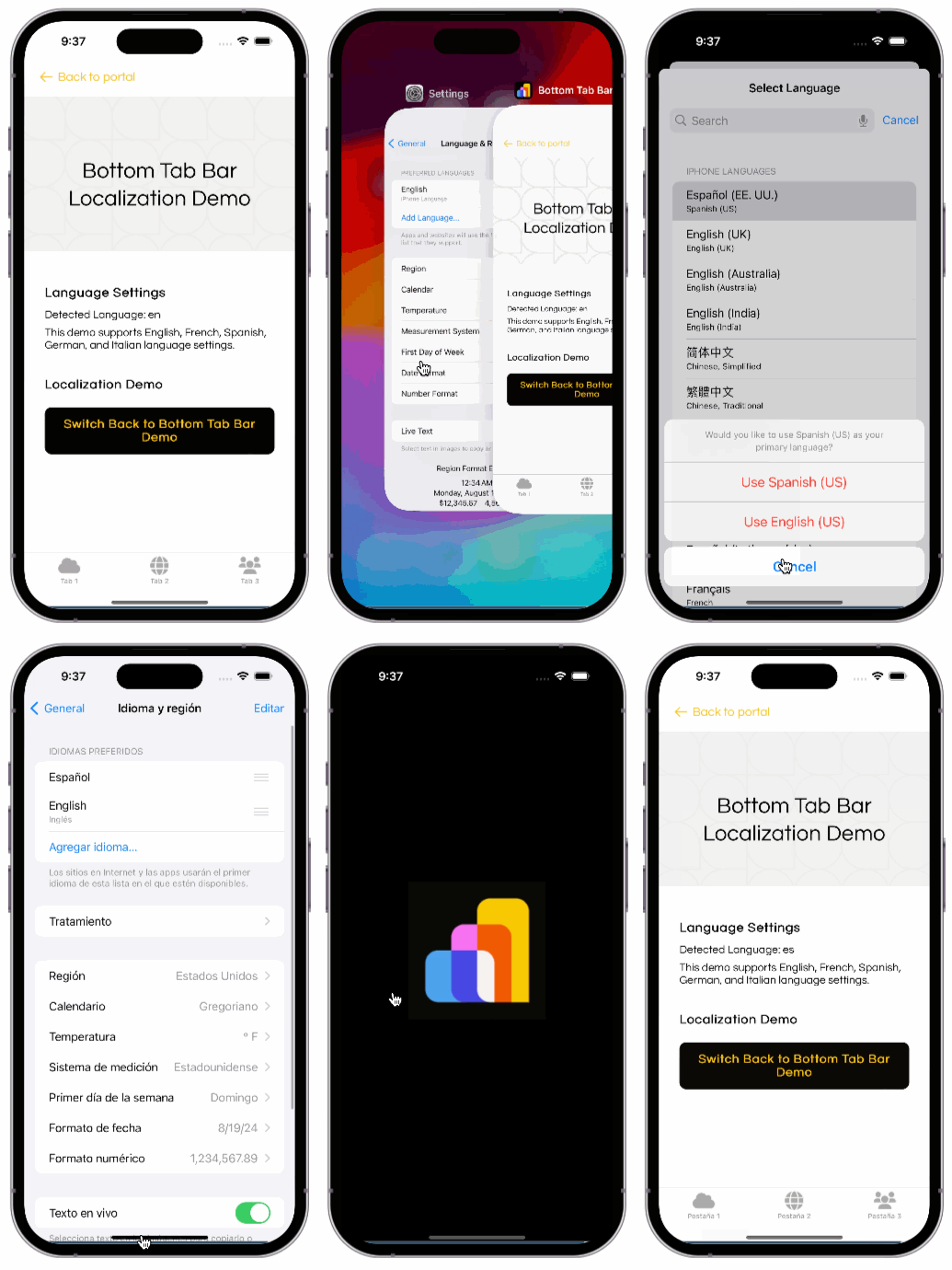
Bottom Tab Bar Localization Demo
Updated about 1 month ago