
Braze
Engage your users by enabling Braze push notifications and event tracking
The Braze Plugin integrates mobile push notifications and in-app event tracking to boost user engagement and strengthen data analytics. It also supports audience segmentation and targeted messaging by leveraging the Braze iOS SDK and Braze Android SDK.
Developer DemoDisplay our demo page in your app to test during development https://median.dev/braze/
Why use this plugin
- Push notifications: Enable push messaging workflows in your app.
- Event tracking: Send custom events to Braze for analytics and campaign logic.
- User targeting: Support segmentation and targeted messaging.
- Deep linking support: Open notification links directly in your app when deep linking is configured.
Prerequisites
- Access to the Braze plugin settings in the Median App Dashboard (Native Plugins tab).
- Braze credentials and endpoints for your platforms:
iosApiKeyiosEndpointKeyandroidApiKeyandroidEndpointKeyfirebaseSenderId
- If using automatic prompts, set
autoRegisterin plugin config. - If testing with the Median demo page, use
https://median.dev/braze/.
Implementation Guide
Braze Setup
Enable push notifications through Braze In-App Messaging as documented in the Braze push primer.
App Configuration
Enable the Braze Plugin in the Native Plugins tab as shown below. The plugin does not require the configuration of the following parameters.
- autoRegister - Determines whether the app should automatically ask for push permissions at app launch
- API Keys and Endpoints - as configured in your Braze dashboard (Settings > APIs and Identifiers > API Keys)
- firebaseSenderId - Firebase Cloud Messaging Sender ID
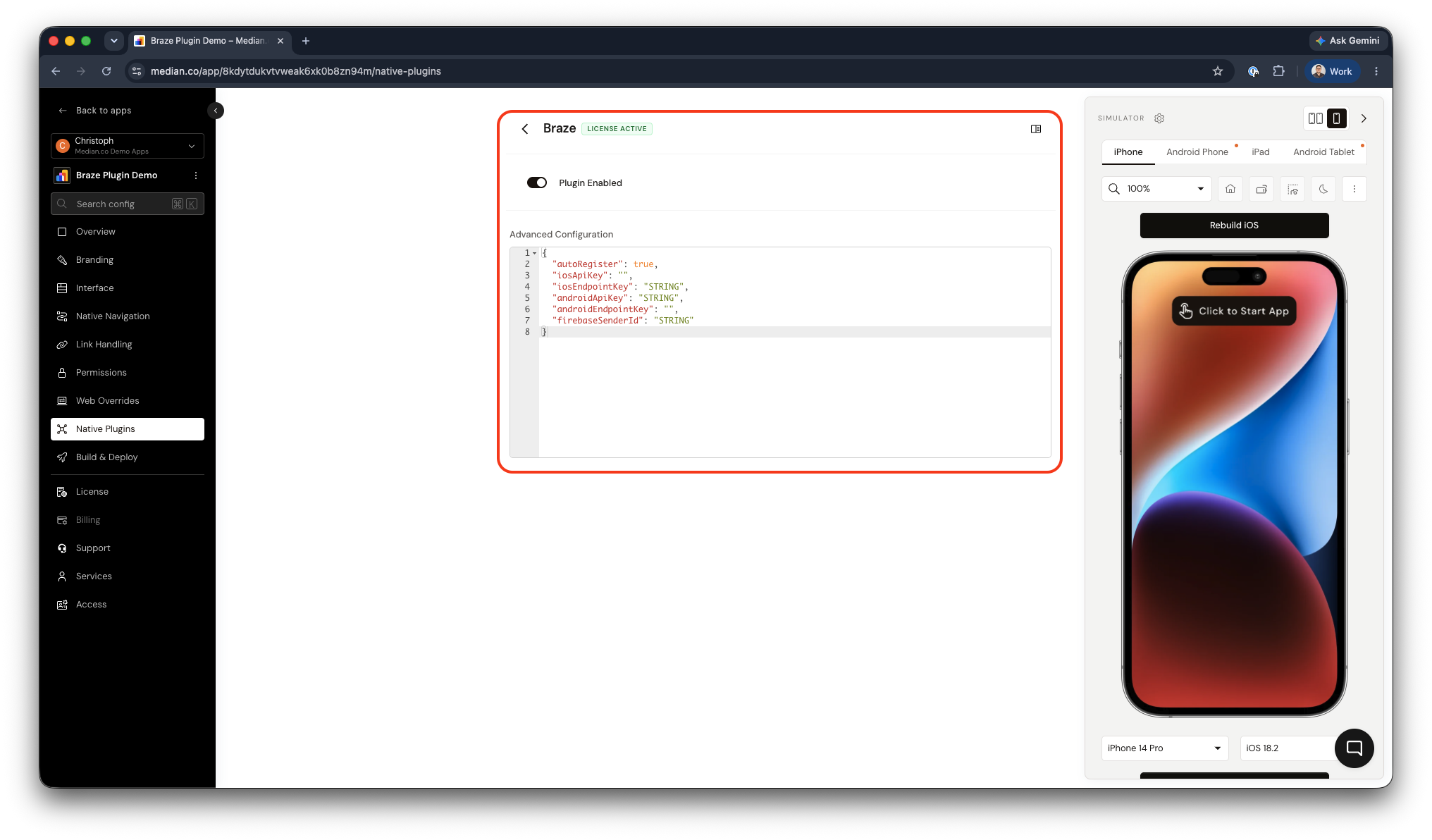
Braze Plugin Enablement and Configuration
Deep linking
Set up Deep Linking within your app, and notification links will automatically open directly into your app.
JavaScript Bridge Functions
Change User
Logs in an existing user or registers a new user in Braze context.
median.braze.changeUser({ userId: "user_123" });Parameters:
| Parameter | Type | Required | Description |
|---|---|---|---|
userId | string | Yes | User identifier to associate with the Braze profile. |
Prompt for Push Notification Permission
Prompts users to enable push notifications.
median.braze.promptNotification({'callback': function})
// Return value:
{
  "granted": true | false
}
Parameters:
| Parameter | Type | Required | Description |
|---|---|---|---|
callback | function | No | Callback that receives { granted: true | false }. |
Check Push Notification Permission
Checks if push notification permission has been granted.
median.braze.notificationEnabled({'callback': function})
// Return value:
{
  "granted": true | false
}
Parameters:
| Parameter | Type | Required | Description |
|---|---|---|---|
callback | function | No | Callback that receives { granted: true | false }. |
Track Custom Events
Sends a custom event to Braze.
Note: Custom Events must be added in the Braze Dashboard.
median.braze.logCustomEvent("YOUR-EVENT-NAME", {
  "key1": value1,
  "key2": value2,
  ...
});
Parameters:
| Parameter | Type | Required | Description |
|---|---|---|---|
eventName | string | Yes | Custom event name (must exist in Braze dashboard). |
properties | object | No | Event key-value payload. |
Testing Checklist
Use this checklist to validate Braze integration:
- Braze plugin configuration is set (including
active, platform API keys, and endpoint keys). -
median.braze.promptNotification()returns a permission result. -
median.braze.notificationEnabled()returns current permission state. -
median.braze.changeUser({ userId })is called for the active test user. -
median.braze.logCustomEvent()is called with a known event name. - Test notifications are sent to a test user from Braze (Test tab).
- Notification opens app when configured as Open App.
Troubleshooting
Test users are not appearing in Braze test send flow
Test users are not appearing in Braze test send flow
Ensure your app calls median.braze.changeUser({ userId: "..." }) so the user is identified before sending test notifications.
Push deep links open incorrectly
Push deep links open incorrectly
Confirm deep linking is set up in your app. Notification links rely on the app’s deep linking configuration.
Permission prompt behavior differs on Android versions
Permission prompt behavior differs on Android versions
On Android 13 and above, explicit permission is required. On Android 12 and below, permissions are granted automatically.
Updated about 1 month ago