
Lovable
Learn how to convert your Lovable app into a full-feature native app with Median.co
Lovable is an AI-powered app builder that lets you create web applications using natural language prompts. It's designed for no code/low code users, indie founders, and small teams who want to build and iterate on UI-focused apps quickly. You can build your app's interface and functionality just by prompting with an AI agent.
Key features
- AI-Powered development: Build and modify your app using simple, conversational text prompts.
- Rapid UI experimentation: Lovable's focus is on the user interface, allowing you to experiment and iterate on your app's design in real-time.
- Supabase backend: Lovable integrates with Supabase to handle backend needs like databases and user authentication.
- MCP server connectivity: You can connect to external MCP servers such as the Median MCP Server and ask the Lovable AI to make improvements to your Median app.
- npm package support: You can ask the Lovable AI to install npm packages, which is how you'll add the Median JavaScript Bridge.
How Median.co works
Median converts your Lovable web app into iOS and Android apps using a WebView approach. Your web app, built with Lovable, runs inside a native "shell" that Median provides. This shell connects your web code to device features like push notifications, haptics, and biometric authentication.
If you are still choosing how to distribute the app, compare the browser, self-managed, and Median approaches in How to convert a Lovable app to iOS and Android.
When you are ready to launch on iOS, you can:
- Connect your Apple Developer account in Median App Studio
- Set Upload to App Store Connect to Automatic
- Test the uploaded build in TestFlight
- Submit it for App Review
You do not need to rewrite your Lovable app in Swift, build it in Xcode, or upload with Apple Transporter for the standard publishing workflow.
| Capability | Median Native App | Lovable Web App |
|---|---|---|
| Runs in Native iOS and Android mobile apps | Yes | No |
| Publish on the Apple App Store and Google Play | Yes | No |
| Native features such as Face ID / Touch ID | Yes | No |
Connecting Lovable to the Median MCP Server
-
Open your Lovable web app project on Lovable.dev and click Connectors in the left navigation menu
-
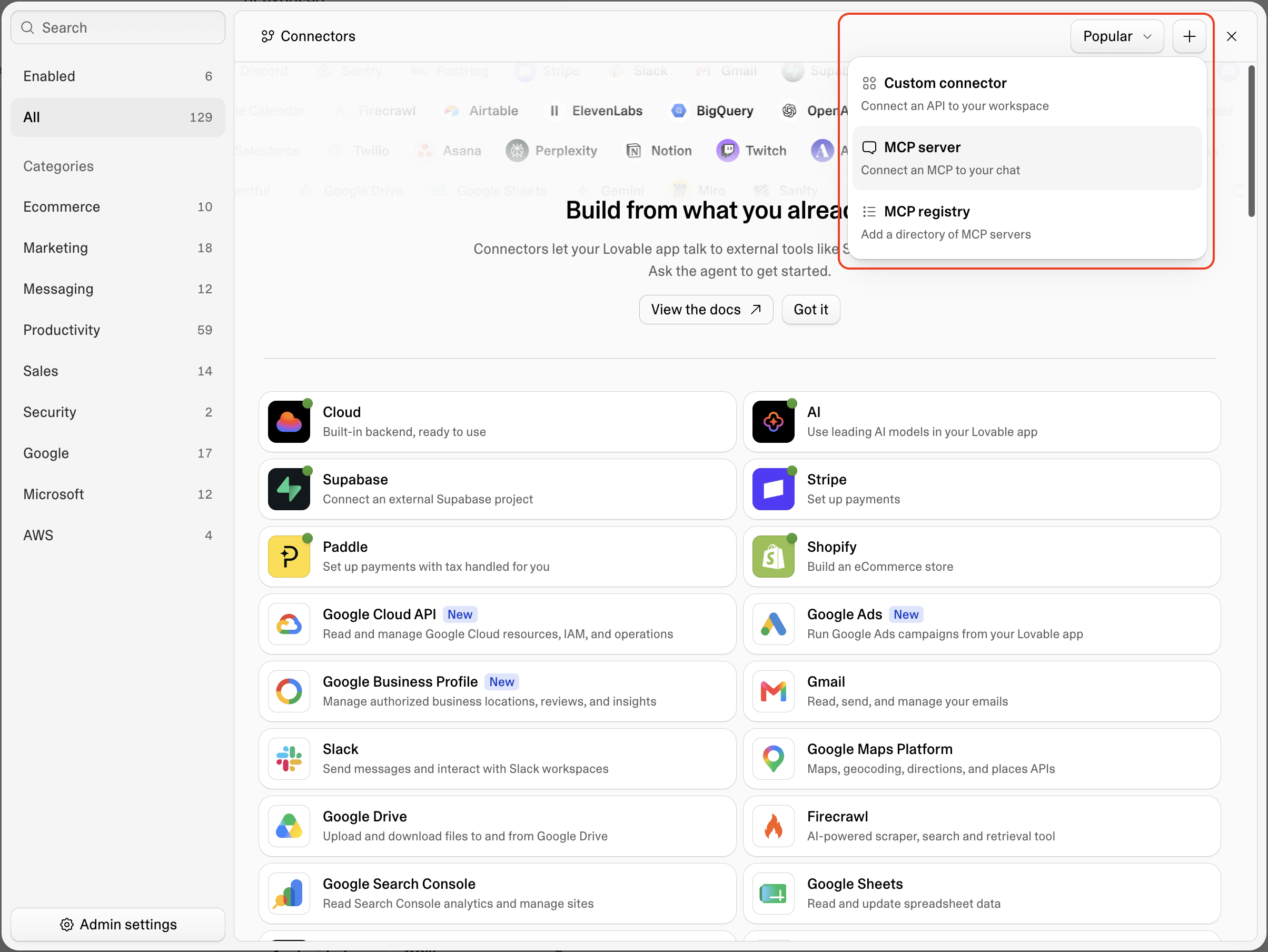
Click the + button on the top right of the Connectors modal dialog and select MCP server
-
Enter Median App Studio (or similar) as the Server name and
https://mcp.median.co/mcpas the Server URL. Leave Authentication as the default OAuth choice and click Add & authorize.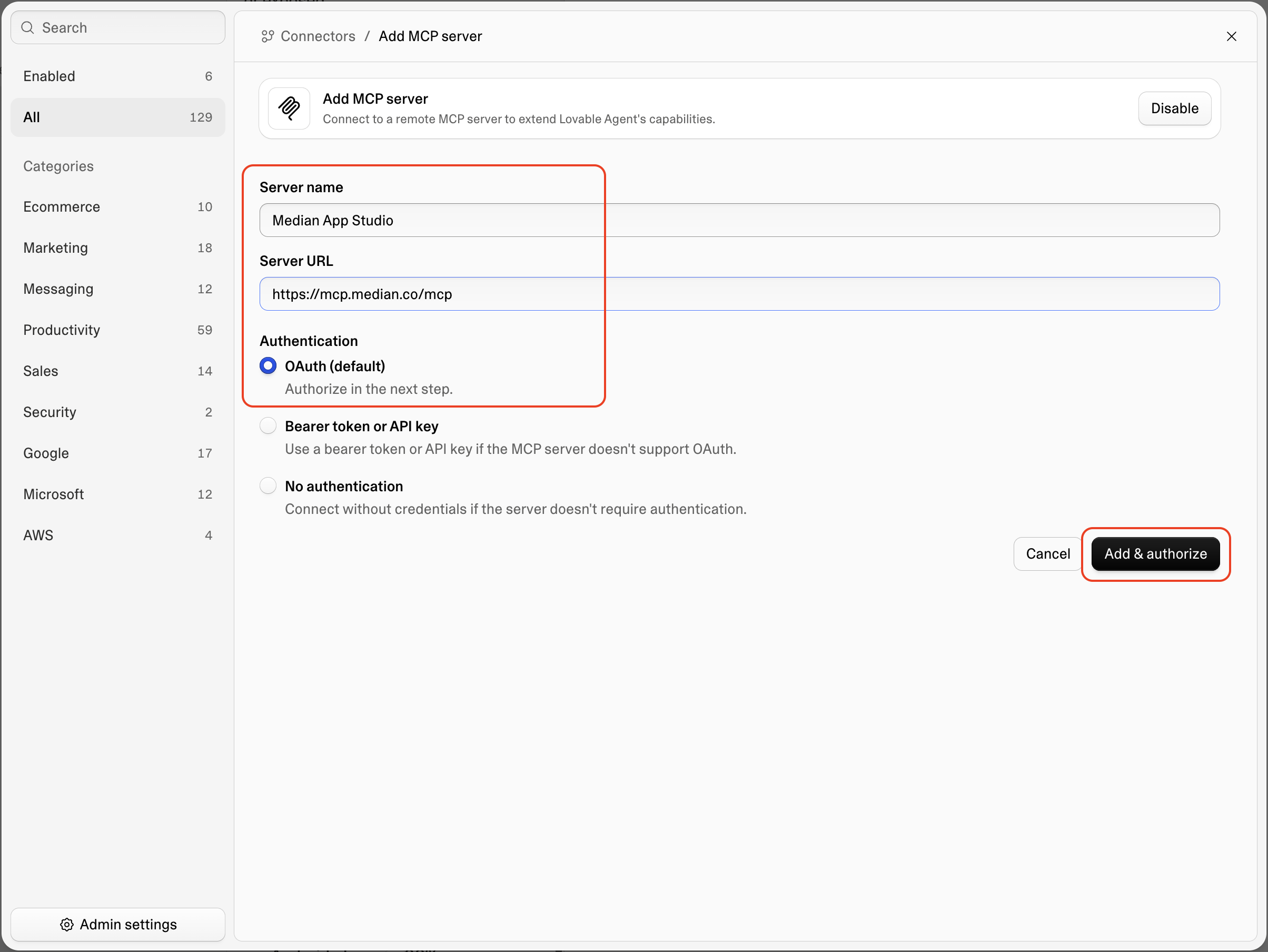
-
After authenticating try a test prompt such as
Run a read-only connection test using the connected Median MCP server. Call its get_me tool and return its full response. -
Start building! Try a prompt such as
Use Median tools to create a new app based on this Lovable project. Use the project’s name and all available branding.
What you'll learn
This guide will walk you through converting your Lovable app to native mobile apps and optimizing it for the best mobile experience.
Median Integration Guide
Median Integration Guide
This guide is structured in 3 parts:
- Part 1: Tutorial - Build a fitness tracker app with Lovable and convert it to a mobile app with Median
- Part 2: Push Notifications - Set up OneSignal and implement advanced notification features
- Part 3: Haptic Feedback - Add tactile feedback to improve user experience
App Optimization Best Practices
App Optimization Best Practices
You'll understand best practices for:
- Mobile-responsive design principles
- Touch-friendly interface design
- Mobile performance optimization
- Form and navigation optimization for mobile
Example Prompts
Example Prompts
You'll get ready-to-use AI prompts for:
- Adding the Median JavaScript Bridge to your project
- Adding haptic feedback to a button
- Adding a native QR/Barcode scanner
- Making your app mobile-responsive
Prompt Best Practices (Median-Specific)
Prompt Best Practices (Median-Specific)
You'll learn how to:
- Structure your prompts for the Lovable AI
- How to avoid AI "hallucinations" by providing documentation
- Test and validate the code your AI agent generates
Frequently Asked Questions
How do I turn my Lovable web app into a native app?
How do I turn my Lovable web app into a native app?
Paste the public URL of your Lovable app into the Website URL field in the Median App Studio. Next, go to the Build and Deploy section and click Rebuild all. You can use the app on a simulator or build it on a mobile device.
Can I publish my app to the Apple App Store and Google Play?
Can I publish my app to the Apple App Store and Google Play?
Yes. Start with Prepare your Lovable app for publishing, then use the Lovable app publishing guide for the complete store review checklist.
Does Median work with .lovable.app URLs?
Does Median work with .lovable.app URLs?
Yes. Median accepts .lovable.app URLs and custom domain URLs. Paste the public URL of your Lovable app into the Website URL field in the Median App Studio. See this guide to learn how to publish your Lovable app and find your app's public URL.
Do I need to rebuild my Lovable app in React Native?
Do I need to rebuild my Lovable app in React Native?
No, your Lovable app codebase stays the same. You only need the public URL of your Lovable app. See the Median architecture overview to learn how Median's apps work.
How is a Median native app different from a Lovable PWA?
How is a Median native app different from a Lovable PWA?
A PWA is still a web application users add to their home screen as a URL bookmark. It doesn't directly integrate with the native device features and cannot be published to app stores.
Median wraps your Lovable web app in a native mobile app. This gives your app access to native device features through Median's native plugin library. Median also provides the native source code required to publish your app to the Apple App Store and Google Play.
Can I add push notifications to a Lovable web app?
Can I add push notifications to a Lovable web app?
Yes. First, add the Median JavaScript Bridge in your Lovable project. Then, connect OneSignal to your app. Use OneSignal to register users and to send push notifications. See Add Push Notifications To Your Lovable App for step-by-step instructions.
Why does my Social Login fail?
Why does my Social Login fail?
If native Google Sign-In works (the picker opens, a token comes back) but
your app fails to authenticate the user, this is usually a nonce
verification mismatch on the Supabase side, not a Median issue. Lovable's
managed Supabase instance doesn't expose the Auth setting needed to fix
this. You'll need to transfer your project to your own Supabase account,
where you can disable nonce checks.
Updated 20 days ago