
Face ID, Touch ID & Android Biometric Authentication
Add secure biometric authentication to your app using Face ID, Touch ID, and Android biometrics
Median's Biometric Authentication Native Plugin provides a streamlined solution for integrating secure biometric authentication across both iOS and Android platforms. The plugin is documented for each platform, offering developers detailed, platform-specific instructions to implement reliable and efficient biometric authentication in your apps.
iOS Face ID and Touch ID
Apple's Face ID and Touch ID provide seamless, secure user authentication through advanced facial recognition and fingerprint scanning technologies. By integrating Apple's LocalAuthentication framework, developers can easily enable Face ID and Touch ID in their apps, ensuring secure access while enhancing the overall user experience.
📖 Learn more: Apple Face ID / Touch ID
Android Biometric
Android biometrics enable secure user authentication through fingerprint, facial recognition, or iris scanning, enhancing both security and user experience. By integrating Android's Biometric API, developers can easily add biometric authentication to their apps, ensuring sensitive data is protected while streamlining the login process for users.
📖 Learn more: Android Biometric
Security Considerations
Both the Apple and Android implementations work the same way at a high level: after a successful login, your web app hands the plugin a secret (string) to store behind the device's secure hardware (Keychain on iOS, Android Keystore on Android). On a later visit, a successful biometric check returns that same string back to your JavaScript. Because the plugin doesn't care what's inside the string, the choice of what to put there has real security implications. This section outlines what's commonly stored and the trade-offs of each.
For simplicity all code examples and developer demos reference are implemented using the username + password approach.
What to store in the secret's JSON object
The secret is passed as a plain string, so in practice most implementations JSON.stringify() an object before saving it, and JSON.parse() it back after retrieval. Common patterns, roughly in order of increasing security:
| Approach | Example shape | Notes |
|---|---|---|
| Username + password | { "username": "andy", "password": "password" } | Simplest to implement as it mirrors a standard login form. However, this means the raw password is stored on the device, even though it's hardware-encrypted. If the biometric layer is ever bypassed or misused, the credential exposed is the user's actual account password, not a revocable token. |
| Auth / session string | { "authString": "a1b2c3..." } | A single opaque token issued by your backend specifically for this purpose. Avoids storing the real password, but if the token is long-lived and non-expiring, it behaves like a permanent password substitute. |
| JWT (JSON Web Token) | { "token": "eyJhbGciOi..." } or the JWT itself as the raw secret | Preferable to a bare password. A JWT can carry its own claims (subject, scopes) and, critically, an expiry. Because the token is verifiable and short-lived, a compromised device yields a smaller blast radius than a compromised password. |
| Refresh token + expiry metadata | { "refreshToken": "...", "issuedAt": 1710000000, "expiresAt": 1710086400 } | The most robust pattern for production apps. The stored secret is used to obtain a fresh access token from your backend rather than being used for login directly, and it can be rotated or revoked server-side independently of the biometric layer. |
Recommendations:
- Prefer a token over raw credentials. Where possible, store an authentication token (ideally a JWT or refresh token) issued by your backend rather than the user's username and password. This lets you revoke access without asking the user to change their password, and limits what an attacker gains if the secret is ever exfiltrated.
- Include and honor expiry parameters. If you store a JWT or session token, include its expiry (
expclaim, or a customexpiresAtfield) and check it before using the secret to log the user in. A token that has expired should trigger a silent refresh (if you're using a refresh token) or fall back to manual login. Don't rely on the biometric prompt itself as an expiry mechanism, since the plugin will return a stale secret if the device's biometric check succeeds. - Treat the stored secret as sensitive as a password, even though it's held in hardware-backed secure storage. Hardware backing protects against extraction from the device, but it doesn't protect against server-side compromise, logging, or the secret being sent over the network insecurely. Always transmit it over HTTPS and avoid logging its contents.
- Delete the secret on credential failure. If a retrieved secret is rejected by your backend (e.g., an expired or revoked token), delete it via the plugin's delete function and fall back to manual login, rather than repeatedly retrying with a dead secret.
- Minimize what's in the payload. Only include what's strictly necessary to authenticate the user.
Domain access and security
By default, any page loaded inside your app can call the Median JavaScript Bridge to retrieve a previously saved secret. This is fine when your app only ever loads pages you control but it becomes a real risk if your app also loads third-party or user-navigable domains (for example, via external links, embedded content, or open redirects), since any page with bridge access could attempt to read the stored secret.
If your app allows any domains outside your own control to load (see Link Handling), it's strongly recommended to whitelist only the specific domains that should be allowed to access the biometric plugin.
To configure this:
- Open the Native Plugins tab in the Median App Studio.
- Click Settings for the Face ID / Touch ID Android Biometrics plugin.
- Add your whitelisted URLs. Regular expressions are supported, so you can use wildcards to whitelist a pattern of subdomains or paths rather than listing every URL individually.
Why this matters for the secret design above: whitelisting controls which pages can call
median.auth.get()it does not change what's returned once a call succeeds. In other words, domain whitelisting and secret design (token vs. password, expiry checks) are complementary controls, not substitutes for one another.
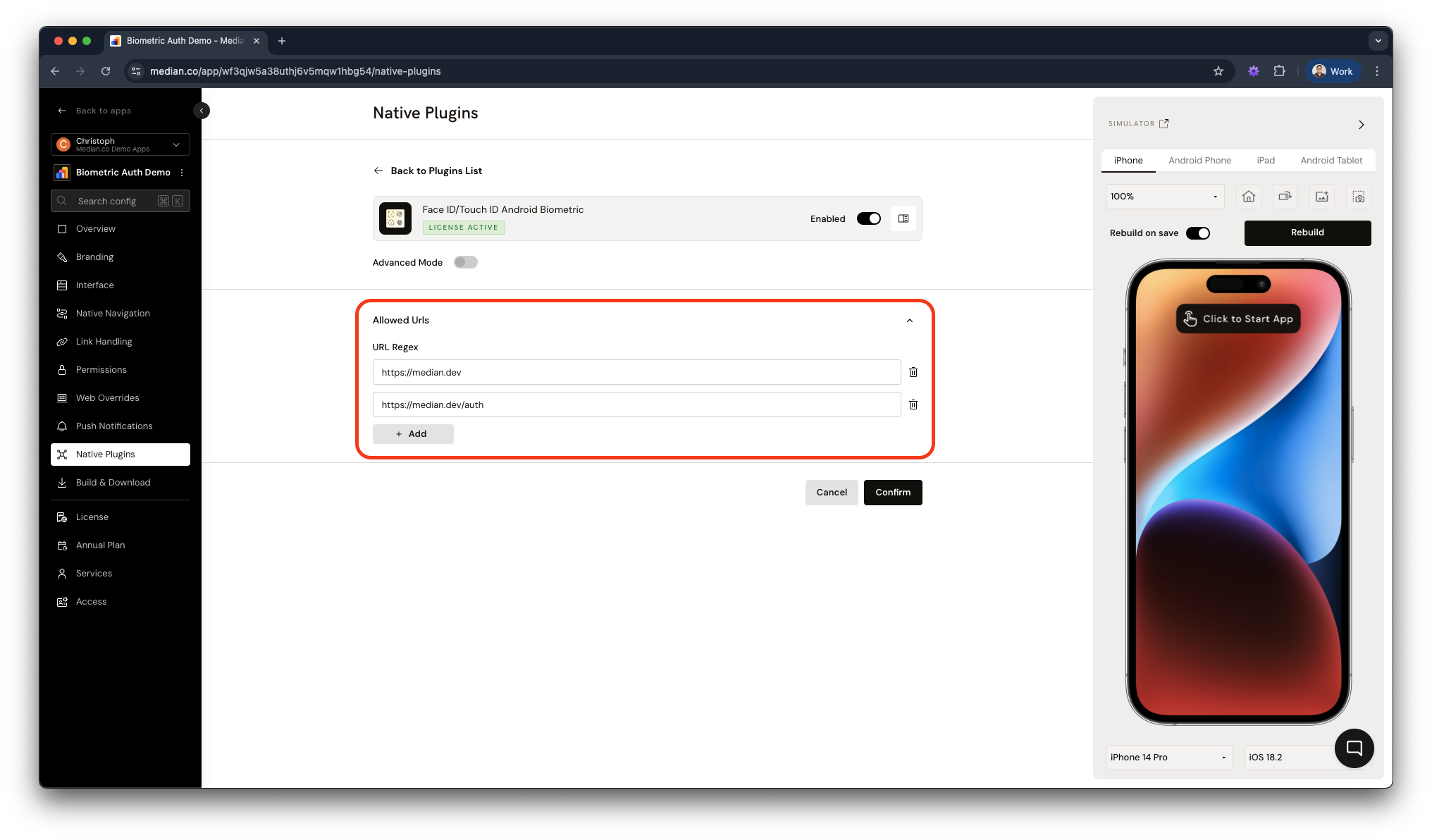
App Studio - Configure domains to access biometrics
Updated 14 days ago