
App Architecture
How Median.co turns your website into a production-grade native app
Apps built using Median.co are much more than your regular web view app. While the apps still rely on embedded browser engines to render your web content within a native applications, they also can be enhanced by advanced native functionality and features.
The native shell is where Median shines wrapping your web content with native UI, device integrations, and plugin capabilities that a plain WebView wrapper can't provide.
The diagram below shows the three layers of every Median app and how they relate to each other.
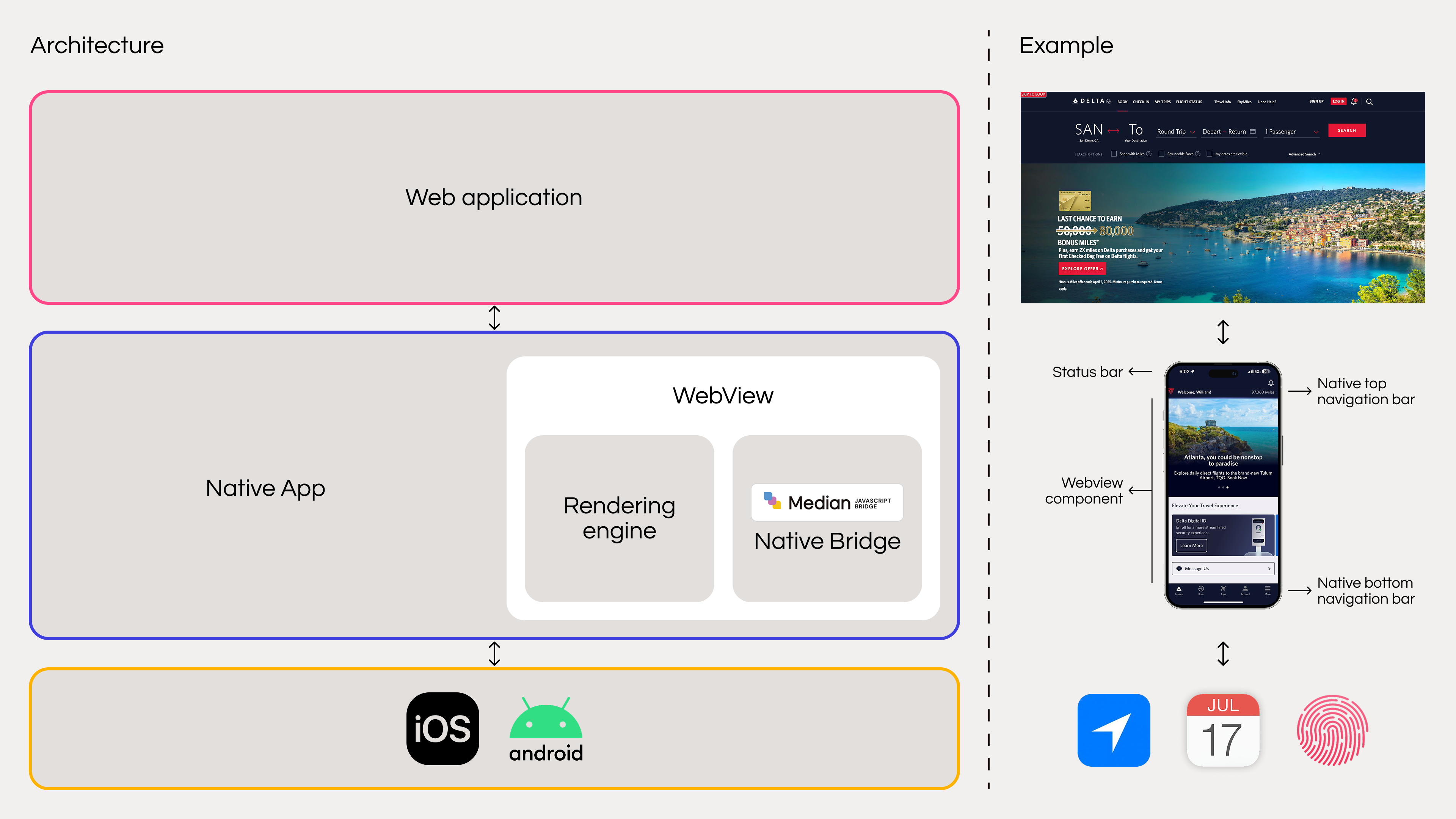
Median.co App Architecture
The three layers of your Mobile App
Each layer has a distinct role. Understanding how they interact helps you make the right decisions when configuring your app, debugging issues, and choosing which native features to add.
Your web application
Your existing website or web app, served from your own domain. Median makes no changes to your web content — if it runs in a mobile browser, it runs in your app. All existing analytics, feature flags, A/B tests, and deployments continue to work as normal. You maintain a single web codebase for all platforms.
The native app (Median's layer)
This is what Median builds and maintains. It contains two core sub-components; a WebView rendering engine and the Median JavaScript Bridge plus any plugins you've enabled. See the sub-sections below for a detailed breakdown of each.
iOS & Android platform
The host operating system. Median targets iOS 13+ and Android 8.1+, covering all devices that receive active Apple and Google security support. As Apple and Android release OS updates, Median releases app updates to maintain compatibility without the need to manage this yourself.
Inside the Webview
Within the native app, a WebView component hosts your web content. Median's WebView layer contains two distinct sub-components that work together to bridge your web app and the native OS.
Rendering engine
On iOS, Median uses Apple's WKWebView. On Android, it uses the Android System WebView (Chromium-based). Both are the same engines that power Mobile Safari and Chrome, so your web content renders identically to a mobile browser.
For apps with specific rendering requirements, Median can embed GeckoView (Firefox's engine) directly into the Android binary, removing the dependency on the shared system component.
Median JavaScript bridge
A bidirectional communication layer between your JavaScript and the native app. Your web code calls median.* methods to invoke native features; the native app fires callbacks back to your page. This is what separates Median from a basic WebView wrapper — your web app gains access to device hardware, native SDKs, and OS APIs through a single JavaScript interface.
JavaScript and CSS compatibility
WKWebView and Android System WebView do not support every browser API. Compatibility varies by OS version. Refer to MDN Web Docs for up-to-date compatibility tables. For methods like Blob and Geolocation, Median provides shim code that translates JavaScript calls into native OS methods automatically.
Native UI
The native app wraps the WebView with platform-standard UI elements. These are built from iOS and Android native components (not HTML) and are fully configurable in the App Studio without touching your web code.
- Status bar - controlled by native OS; color configurable via Median
- Top navigation bar - title, back button, custom action buttons; optional side bar, fully native
- WebView component - your web app renders here
- Bottom tab bar - native tab navigation; dynamic, localizable
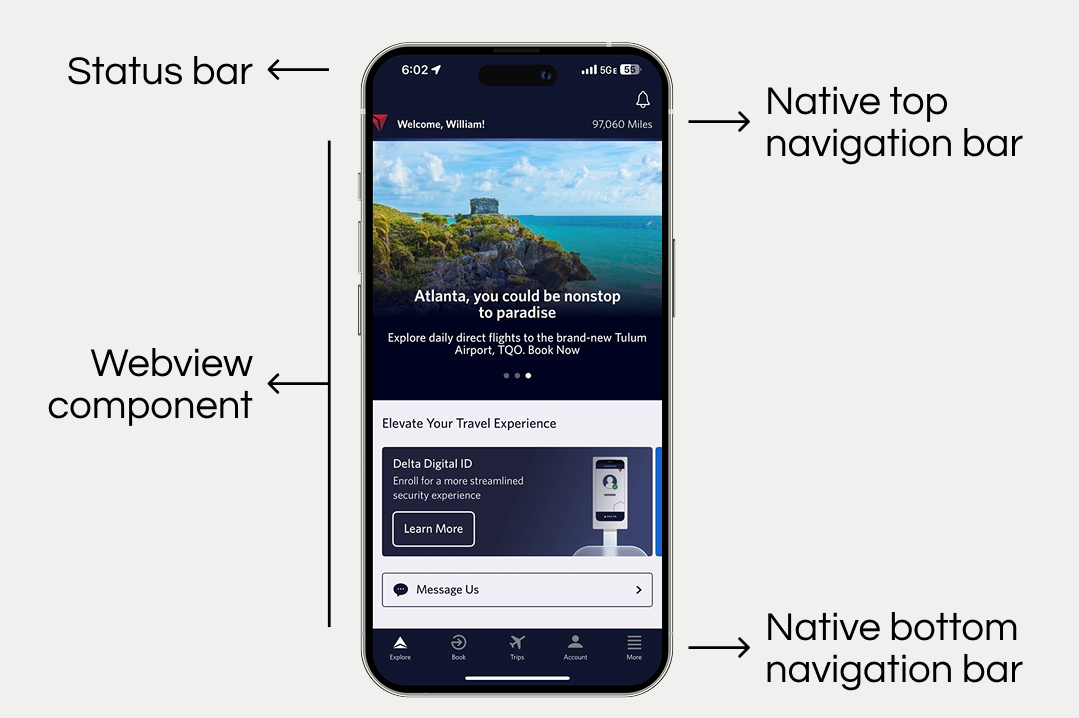
Native UI Example
Native navigation elements load instantly and respond instantly regardless of your web app's performance, because they're rendered by the OS. They also automatically adapt to platform conventions (e.g. iOS swipe-back gestures, Android back button behavior).
Native Enhancements
Beyond the base WebView, Median exposes three categories of native functionality that turn a simple WebView app into a production mobile experience.
Native navigation
Top navigation bars, sidebar menus, and bottom tab bars — all built from native components. Dynamic menu items, custom icons, localization, and deep-link support included.
Push notifications
Deep integrations with OneSignal, Braze, Klaviyo, Iterable, Salesforce Marketing Cloud, and more. Foreground notifications, in-app messages, and programmatic triggers.
Native plugins
Biometric auth (Face ID, Touch ID, Android Biometric), in-app purchases, QR/barcode scanning, camera, NFC, social login, analytics SDKs, and more.
All three categories are integrated via the Median JavaScript Bridge and you call a single JavaScript API from your web code, and Median handles the native SDK interaction on both platforms simultaneously.
Platform support & WebView compatibility
| Platform | WebView engine | Minimum OS version | Alternative renderer |
|---|---|---|---|
| iOS | WKWebView | iOS 13+ | - |
| Android | Android System WebView | Android 8.1+ | GeckoView (embedded) |
Android System WebView is a shared component: all apps on the device use the same instance, which means a system update can briefly interrupt apps that are running.
If your app requires isolated rendering, consistent behavior across all Android versions, or freedom from shared-component edge cases, Median can embed GeckoView directly in your binary at the cost of a larger app size.
Checking specific API support
Not every browser API is available in WKWebView or Android System WebView. For detailed compatibility by OS version, consult MDN Web Docs. For open rendering bugs, see the WebKit issue trackerand Chromium Blink tracker.
Performance considerations
App performance is directly tied to web performance. Since your web app runs in the same rendering engine it would in a mobile browser, so any bottlenecks in your web code affect the app equally. There are, however, specific ways the native layer can improve perceived performance.
Web-side factors
JavaScript bundle size, unoptimized images, render-blocking resources, and slow API responses all affect app performance directly. Profile and optimize your web app and the WebView will benefit immediately.
Native-side gains
Native navigation bars render at 60fps from the OS, not from your JavaScript thread. Switching to native tab menus and top bars removes the most common cause of perceived jank in web-based navigation.
SDK optimizations
Native SDKs (analytics, media, auth) are purpose-built for mobile and often outperform their JavaScript equivalents in battery efficiency, background behavior, and startup time.
Caching strategy
The WebView caches assets like a browser. Use Cache-Control headers and content-hashed filenames to control freshness. Properly cached apps load significantly faster on repeat opens.
For debugging performance issues across both layers, see the Development & Test Deep Dive.
Solutions Architecture Services
For teams planning a complex integration or migrating an existing native app, Median offers guided architecture support.
Developer onboarding
Live 1-on-1 sessions with a Solutions Architect, customized training for your app's feature set, and proof-of-concept walkthroughs covering deep linking, native navigation, and plugin integration.
Virtual Onsite
A technical review of your app's configuration aligned to your product goals, resulting in an actionable report with specific recommendations and next steps.
To book ad hoc architecture services, open the Services tab when viewing your app on the Median platform. Or, contact our Solutions Architecture Team to explore which service best fits your needs.
Frequently Asked Questions
Will this work with my existing website?
Will this work with my existing website?
Yes. Median works with any website or web app — WordPress, Webflow, Salesforce Lightning, Bubble, React, Next.js, .NET, or anything else. If it renders correctly in a mobile browser, it renders correctly in your Median app. No changes to your web codebase are required to get started.
What makes this different from a basic WebView wrapper?
What makes this different from a basic WebView wrapper?
A basic wrapper just displays your website in a fullscreen WebView. Median adds a production-grade native shell: the JavaScript Bridge gives your web code access to native device APIs; native navigation components provide platform-standard menus and tab bars; native plugins integrate iOS and Android SDKs for push notifications, biometric auth, in-app purchases, analytics, and more. The App Studio also handles rebuilding your app for every new iOS and Android release, so you don't maintain native code yourself.
How do I keep users logged in after closing the app?
How do I keep users logged in after closing the app?
Login behavior mirrors your website. Use a persistent cookie (not a session cookie) to keep users authenticated across app restarts and device reboots. Session cookies expire when the app is closed. Any server-side cookie invalidation or timeout will still apply as normal.
Can I modify the app source code?
Can I modify the app source code?
Yes. Full iOS (Xcode) and Android (Android Studio) source code is available for download, and your license clarifies modification. After making changes, Median's engineering team can create a custom plugin based on your modifications so that you continue receiving app updates through the App Studio. See Build iOS from source and Build Android from source.
Can I use GeckoView instead of Android System WebView?
Can I use GeckoView instead of Android System WebView?
Yes. Median's engineering team can embed GeckoView (Mozilla's rendering engine) directly into your Android binary. This avoids the shared-resource limitations of Android System WebView including app crashes during system WebView updates and edge-case input delay bugs. The trade-off is a significantly larger app binary size. Contact Median for custom development if this is a requirement.
How do I fix blank pages or SSL errors?
How do I fix blank pages or SSL errors?
Blank pages or SSL errors are almost always caused by an SSL misconfiguration on your server or a third-party resource your page loads. Check your certificate chain at https://www.ssllabs.com/ssltest/. Common issues include expired certificates, incomplete chains, and SHA-1 signed intermediates. Also inspect your browser's JavaScript console for mixed-content warnings from other domains.
How do I optimize caching?
How do I optimize caching?
The WebView caches assets like a browser. You can use Cache-Control response headers on static assets and content-hashed filenames (e.g. app.a3f2bc.js) so the cache invalidates automatically on deploy. Dynamic responses (API calls, HTML pages) should either set short max-age values or opt out of caching entirely.
How do I disable unencrypted HTTP traffic?
How do I disable unencrypted HTTP traffic?
Set "allowInsecure": false in the security.network object of your appConfig.json. This restricts all network traffic to HTTPS only. If the security object is missing in your appConfig.json, you can create it as shown in the example below:
"security": {
    "network": {
        "allowInsecure": false
    }
}
Updated about 1 month ago