
Customer.io
Engage your users by enabling Customer.io push notifications and tracking events
The Customer.io plugin enables native mobile push notifications and rich event tracking to maximize engagement and audience insight. It integrates the official Customer.io Swift SDK on iOS and the Customer.io Kotlin SDK on Android.
This guide covers Customer.io account setup, Median App Studio configuration, and Median JavaScript Bridge APIs for permissions, identities, and event tracking.
Developer DemoDisplay our demo page in your app to test during development: https://median.dev/customerio/
Why use Customer.io
- Native push on both platforms: Native push on both platforms: Send push notifications directly to iOS and Android devices using Customer.io's SDKs inside the Median shell.
- Bridge-first control: Manage user authentication, update profile attributes, track custom behavioral events, and request permissions directly from JavaScript without writing native code.
- Rich Event Tracking: Capture custom client-side conversions and activities to power dynamic segments and workflows in your workspace.
- Deep linking: When deep linking is configured, notification taps can open the right screen in-app instead of the device browser.
Prerequisites
- A Median.co app with the JavaScript Bridge enabled
- A Customer.io account with an active workspace.
- Your Customer.io Site ID and CDP API Key for iOS and Android.
google-services.jsonuploaded in your Median app configuration (required for Firebase Cloud Messaging delivery on Android).
Implementation Guide
Customer.io Setup
Create platform-specific sources in Customer.io to obtain your CDP API Key and Site ID. Median handles the native SDK initialization once those credentials are configured.
Follow the official Customer.io guides to complete source creation:
App Configuration
- Open Median App Studio for your app.
- Enable the Customer.io native plugin.
- Enter your CDN API Key, Region, Site ID and Log Level.
- Rebuild your app to include the Customer.io SDKs including your settings.
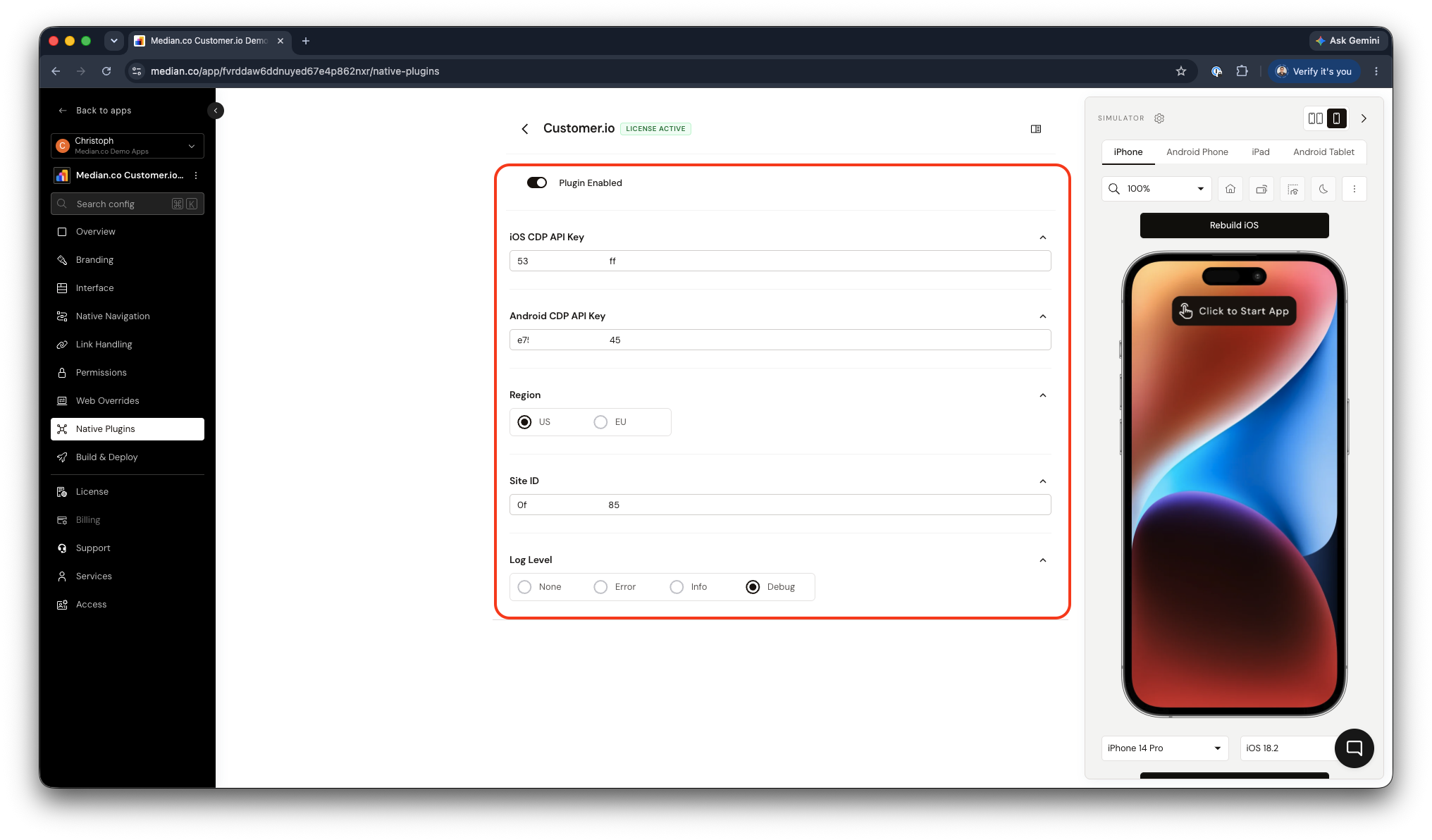
Customer.io Plugin Configuration
Plugin Configuration options
| Setting | Required | Description |
|---|---|---|
| CDP API Key | Yes | Authorizes payloads sent from the SDK. Obtained from your Customer.io source setup. You will need to follow the Customer.io Authentication guide to set up your CDP API Key. |
| Region | EU accounts only | Set to EU if your Customer.io workspace is hosted in the EU region. Defaults to US. |
| Site ID | Yes | Used to initialize the SDK and associate data with your workspace. |
| Log Level | No | Controls SDK log verbosity. Use debug or info during development; leave empty or set to error in production. |
Rebuild after ConfigurationPlugin settings take effect only in new builds. After changing credentials or uploading new Firebase configuration files, rebuild your app and test on a real device or simulator before releasing.
Deep linking (Optional)
The Customer.io plugin integrates with Median deep linking. When deep links are configured, users who tap a push notification are routed to the correct screen inside the app rather than to the mobile browser.
To enable this:
- Configure URL schemes, Universal Links (iOS), and App Links (Android) in Median App Studio.
- Ensure the URLs used in Customer.io campaigns match the routes handled inside your app.
JavaScript bridge functions
All methods are available on the median.customerio namespace and must be called after the Median JavaScript Bridge is fully initialized. Wrap calls in a deviceready listener or equivalent initialization check.
Push Notification Permissions
Request permission
Triggers the native OS permission prompt. For best results, defer this call to a point in the user journey where the value of notifications is clear. Contextual prompts have significantly higher opt-in rates.
On Android 12 and below, notification permission may be granted automatically depending on device OS version and policy.
median.customerio.push.requestPermission({
  callback: function (result) {
    console.log("Permission granted status:", result.granted); // true or false
  }
});
Check permission status
Returns whether the user has currently granted or denied notification permission at the OS level.
median.customerio.push.getPermissionStatus({
  callback: function (result) {
    console.log("Are notifications enabled?", result.granted); // true or false
  }
});
Listen for push events
Register listeners to respond when notifications are received in the foreground or tapped by the user.
// Triggers when a push notification is clicked/opened by the user
pushOpenedId = await median.customerio.push.opened.addListener((data) => {
  alert(JSON.stringify(data));
});

// Triggers when a push notification is delivered while the app is active
median.customerio.push.received.addListener((data) => {
  alert(JSON.stringify(data));
});
User Identity
Identify a user
Associates the current device session with a user profile in your Customer.io workspace. Call this immediately after login. Pass a stable unique identifier (such as a database user ID) and any traits you want to attach.
median.customerio.identify({
  userId: "user_12345",
  traits: {
    company: "Acme Corp",
    plan: "pro"
  }
});
Get the current user ID
Returns the user ID currently associated with the session.
median.customerio.getUserId();Clear user identity
Clears the active session, detaches the device token from the user profile, and stops event tracking. Call this on logout to prevent push notifications from being delivered to the wrong user if the device is shared.
median.customerio.reset();Profile and Device Attributes
Set profile attributes
Adds or updates key-value pairs on the identified user's Customer.io profile. Useful for maintaining segment membership or personalizing message content.
median.customerio.setProfileAttributes({
  last_seen: new Date().toUTCString(),
  subscription_tier: "gold"
});
Set device attributes
Adds or updates metadata on the specific device/token instance rather than the user profile. Use this for device-level properties such as app version or display language.
median.customerio.setDeviceAttributes({
  app_version: "3.1.0",
  locale: "en-CA"
});
Delete device token
Removes the device push token from Customer.io. Call this alongside reset() on logout to ensure push notifications are not sent to a device after the user has signed out.
median.customerio.deleteDeviceToken();Event tracking
Track user actions and screen views to trigger Customer.io workflows, update segments, and measure campaign conversions.
Track an event
median.customerio.track({
  name: "Completed Purchase",
  data: {
    order_id: "ORD-9921",
    total_value: 59.99,
    currency: "USD"
  }
});
Track a screen view
median.customerio.screen({
  name: "Checkout"
});
Testing checklist
Use this checklist to ensure Customer.io is working correctly in your app:
- Initialization Verification: Confirm your Site ID and Track API Key are populated correctly within Median App Studio.
- Identity Mapping: Invoke
median.customerio.identify()and check the Customer.io Activity Log to verify the profile shows up in real time. - Event Flows: Run a trackEvent check from your app and confirm that segment metrics increment inside your Customer.io workspace.
- Lifecycle State Clears: Verify that firing clearIdentity() stops tracking behavior and terminates active device token linkages upon sign-out.
Troubleshooting
Push permission returns denied even though I expect it to work
Push permission returns denied even though I expect it to work
On iOS, check that the user has not disabled notifications for the app in Settings. On Android 13+, ensure you triggered a runtime permission request (requestPermission or startup flow). If Automatic Registration is Disabled, you must prompt explicitly before expecting tokens.
Deep links open in the browser instead of the app
Deep links open in the browser instead of the app
Configure Median deep linking (URL scheme, Universal Links, App Links) so the URL Customer.io uses matches routes handled inside the app.
Updated 6 days ago