
Control your Median app with Google Tag Manager
Overview
Google Tag Manager(GTM) is a free platform by Google used to deploy and update code(tags) on your website instead of updating the website's code. Use Median's GTM Template, to connect your website to the Javascript Bridge and trigger Bridge commands using GTM tags. The template injects the Median JavaScript Bridge (median.min.js) into the website using a sandboxed environment. It provides robust error handling, debugging logs, and dataLayer pushes to track the status of the bridge injection.
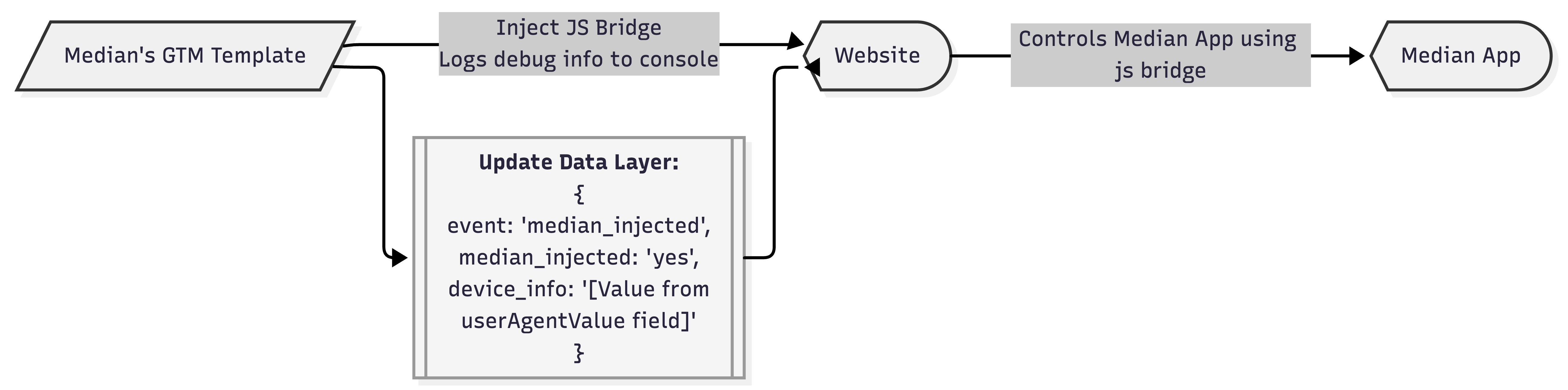
Flowchart- Using Median's Google Tag Manager Template
Required Permissions
For security reasons, this template is sandboxed and utilizes the following permissions:
- Injects Scripts: Allows the injection of scripts specifically from https://unpkg.com/ where the javascript bridge is hosted
- Accesses Global Variables: Allows pushing data into the
dataLayerarray. - Logs to Console: Allows the template to print debugging and status messages to the browser console.
Configuration Fields (optional)
- Bridge Version (bridgeVersion)
- Enter the version number of the JavaScript bridge that will be injected.
- If left blank, defaults to the latest version
- User Agent Variable (userAgentValue)
- Enter the name of your user-defined variable that stores the device user agent string
- This value is included in console logs and passed into the
dataLayerpayload to provide the following device information: Browser, Operating, and Device type
How It Works
- Debugging Initialization: The template reads the
userAgentValuefield and logs the user agent to the GTM preview console to confirm the Median app was detected. - Dynamic URL Construction: The template pulls the version number from the
bridgeVersionfield and constructs the CDN URL:https://unpkg.com/median-js-bridge@[version]/dist/median.min.js - Script Injection: Using GTM's sandboxed
injectScriptAPI, it attempts to load the constructed URL into the document. - State Handling: Depending on the outcome of the script injection, a specific event is pushed to the
dataLayerand the tag successfully resolves or fails.
DataLayer Events
The template automatically pushes an event named median_injected to the dataLayer upon completion. You can use this event to trigger subsequent tags.
On Success
If the script successfully loads from the CDN, the following payload is pushed:
JavaScript
{
  event: 'median_injected',
  median_injected: 'yes',
  device_info: '[Value from userAgentValue field]'
}
On Failure
If the script fails to load, the tag signals a failure to GTM and pushes the following payload:
JavaScript
{
  event: 'median_injected',
  median_injected: 'no',
  device_info: '[Value from userAgentValue field]'
}
Updated about 1 month ago