
Background Location
Allow your app to run in the background while subscribed to device location updates
The Background Location plugin extends Median.co's geolocation support to keep your app receiving location data even after it's paused or backgrounded. Missed updates are delivered in batch when the app resumes, and location data can be posted directly to a server endpoint while the app is backgrounded.
Developer DemoDisplay our demo page in your app to test during development: https://median.dev/background-location
By default, Median apps have access to the HTML5 geolocation APIs to retrieve the user's current location and to subscribe to location update changes. The HTML5 geolocation APIs have a few limitations when used in a Webview environment:
- When the app is paused/backgrounded, location updates may be paused. Updates typically resume when the app is brought back to the foreground, but the device's movements while paused are lost.
- JavaScript is paused when the app is backgrounded, preventing any processing of new locations.
The Median JavaScript Bridge commands described below allow JavaScript to receive missing location updates when the app is temporarily backgrounded. They also support uploading location updates to a server for intelligent background processing, or performing any other task on an ongoing basis.
Why use Background Location
- Fitness apps: Track distance biked, run, or walked while the app is launched but running in the background.
- Delivery / dispatch apps: Track drivers' real-time locations and trigger automated dispatch notifications to the closest driver.
- Geofencing: Leverage background location data to conditionally enable functionality or engage the user.
- Server-side processing: Post location updates directly to your backend while the app is backgrounded, enabling real-time tracking, dispatch logic, or data backup without requiring the app to be in the foreground.
Permissions
When background location is active on iOS, the app may modify the device’s status bar to indicate it is using the device location. This also provides a convenient way for the user to return to the app by tapping the status bar.
Android requires that an ongoing service display a foreground notification. You may customize the title and text for this notification.
The Background Location Native Plugin requires the iOS location permission authorizedAlways and Android permissions ACCESS_FINE_LOCATION, ACCESS_COARSE_LOCATION and ACCESS_BACKGROUND_LOCATION.
If you only require the background process to run while your app is open on the device you can add an additional parameter to your appConfig.json as follows: foregroundOnly: true.
On iOS this configuration uses the location permission authorizedWhenInUse rather than authorizedAlways.
On Android the permission ACCESS_BACKGROUND_LOCATION is not required, only ACCESS_FINE_LOCATION and ACCESS_COARSE_LOCATION are requested.
Implementation Guide
App configuration
- In Median App Studio, open your Native Plugins tab.
- Find the Background Location plugin in your list of 'Added plugins' and activate it as shown below.
- Rebuild your app to apply the new configuration.
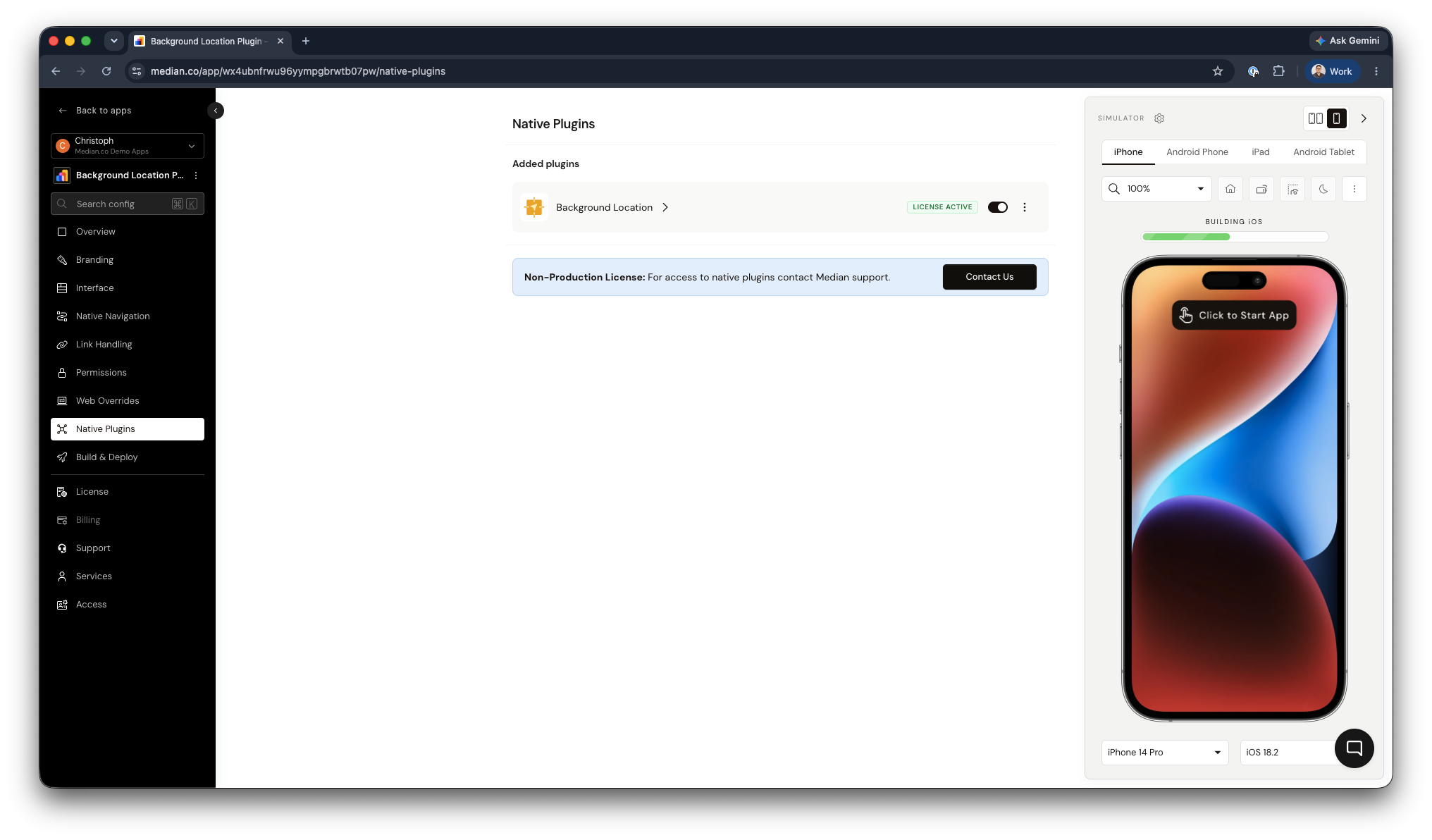
Background Location Plugin Activation
Manual Build Process
If you build from downloaded iOS source or manually manage Apple signing assets, open the Capabilities tab in Xcode, expand Background Modes, and enable Location updates as shown below. This step is not required if you're using the IPA or our publishing services deployment.
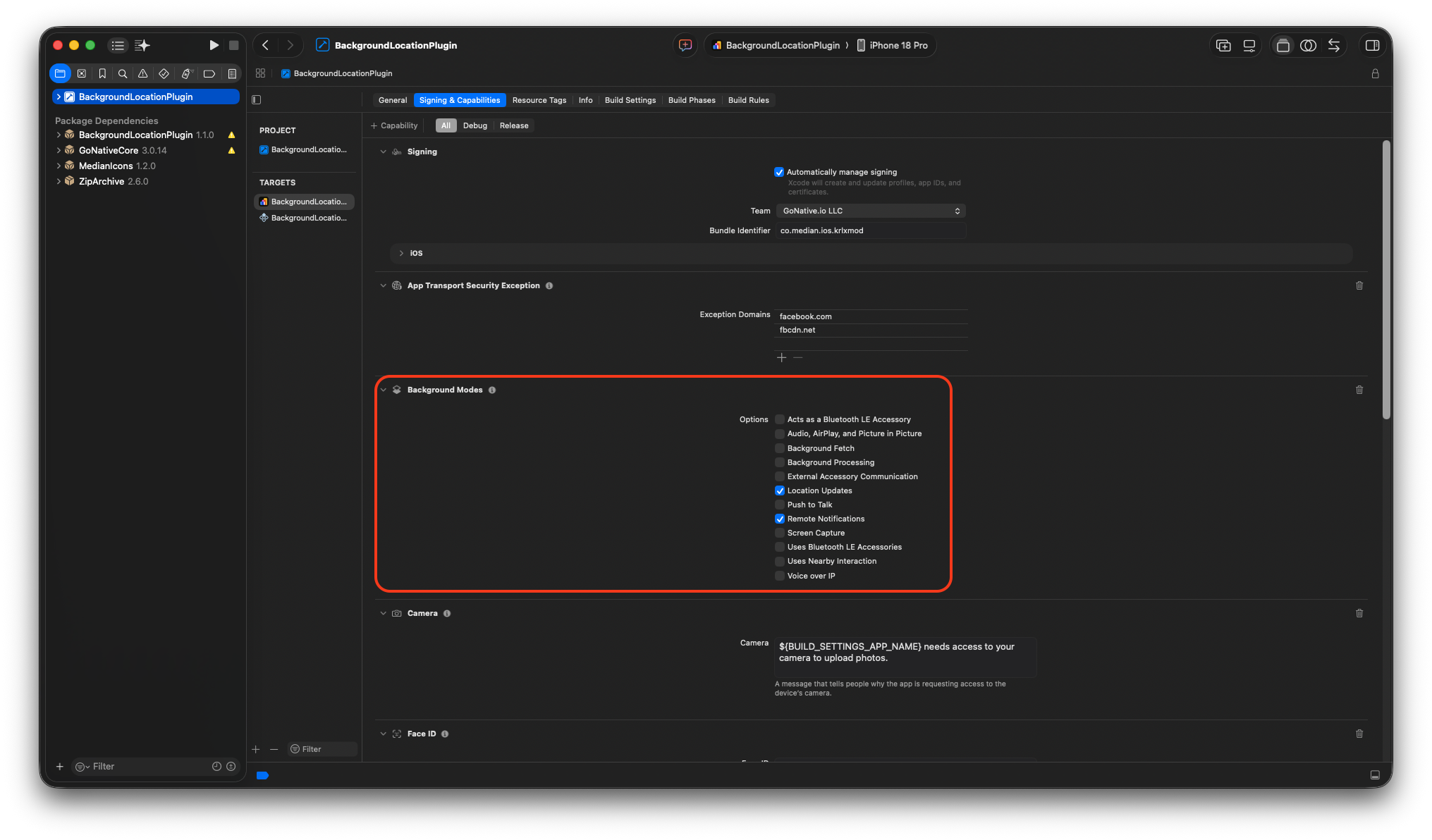
XCode Background Modes
JavaScript Bridge Implementation
Start background location service
Starts the background location service. Pass a locationRequest configuration object specifying where to deliver location updates and how the location provider should behave on each platform.
median.backgroundLocation.start(locationRequest);Parameters:
The locationRequest object accepts the following fields. At least one of callback or postUrl is required.
Delivery parameters
| Parameter | Type | Required | Description |
|---|---|---|---|
callback | function | Conditional | JavaScript function that receives location updates. Required if postUrl is not provided. Paused while app is backgrounded; missed updates delivered in batch on resume. |
postUrl | string | Conditional | URL to which location updates are POSTed as a JSON object. Required if callback is not provided. Continues to receive updates while app is backgrounded. Embed any authentication tokens directly in the URL, as session cookies are not included. |
iOS-specific parameters
| Parameter | Type | Required | Description |
|---|---|---|---|
iosBackgroundIndicator | boolean | No | Default false. When true, modifies the iOS status bar while the app is backgrounded to indicate it is using location, and provides a quick way to return to the app. |
iosPauseAutomatically | boolean | No | Default true. Allows iOS to automatically pause location updates when the location is unlikely to change. |
iosDistanceFilter | number | No | In meters. Default 0.0. Does not update location if the device has moved less than this distance since the last update. |
iosDesiredAccuracy | string | No | Desired accuracy level. Lower accuracy enhances battery life. Values: best (default), bestForNavigation, tenMeters, hundredMeters, kilometer, threeKilometers. |
iosActivityType | string | No | Hints to iOS how to behave when iosPauseAutomatically is enabled. Values: other (default), automotiveNavigation, otherNavigation, fitness, airborne. |
Android-specific parameters
| Parameter | Type | Required | Description |
|---|---|---|---|
androidInterval | number | No | Preferred rate in milliseconds for receiving updates. Actual interval may be faster or slower. |
androidFastestInterval | number | No | Fastest rate in milliseconds at which the app can receive updates. Actual interval may be slower. |
androidPriority | string | No | Hints to the device which location sources to use. Values: highAccuracy (likely GPS), balanced (~100 m, WiFi/cell), lowPower (~10 km), noPower (no active triggering). |
androidSmallestDisplacement | number | No | In meters. Default 0. Minimum location change since the last update before a new update is delivered. |
androidNotificationTitle | string | No | Title for the Android foreground notification displayed while the service is active. |
androidNotificationText | string | No | Body text for the Android foreground notification. |
Location updates are also sent to the callback function and/or postUrl while the app is in the foreground. When the app is in the background, updates to postUrl continue but the JavaScript callback function is paused. When the app is resumed, any location updates that the callback function missed are sent in a large batch.
Data Format
Location updates are delivered as an object containing a locations array. Each item in the array is a location object with the following fields. Fields are not all guaranteed to be populated; values may be null or undefined.
| Field | Platform | Description |
|---|---|---|
timestamp | Both | Time of this location update, in seconds since Jan 1 1970. |
latitude | Both | Latitude in degrees. |
longitude | Both | Longitude in degrees. |
altitude | Both | Altitude in meters. |
floor | iOS only | Floor of the building in which the user is located. |
horizontalAccuracy | Both | Horizontal accuracy in meters. |
verticalAccuracy | Both | Vertical accuracy in meters. |
speed | Both | Instantaneous speed of the device in meters per second. |
speedAccuracy | Android only | Speed accuracy in meters per second. |
bearing | Both | Direction of device movement in degrees clockwise from north. Range: [0.0, 360.0]. |
bearingAccuracy | Android only | Bearing accuracy in degrees. |
Sample code
As an example, you may use this JavaScript code to start background locations:
function locationUpdated(data) {
	console.log('got location', data);
}

var locationRequest = {
	callback: locationUpdated,
	postUrl: 'https://example.com/location/user123?token=abcabc',
	iosBackgroundIndicator: true,
	iosPauseAutomatically: true,
	iosDesiredAccuracy: 'bestForNavigation',
	iosActivityType: 'automotiveNavigation',
	androidPriority: 'highAccuracy',
	androidNotificationTitle: 'Navigation',
	androidNotificationText: 'Tap to return to app'
};

median.backgroundLocation.start(locationRequest);
Stop background location service
Stops the background location service and ends all location updates.
median.backgroundLocation.stop();Testing Checklist
Basic functionality
-
median.backgroundLocation.start(locationRequest)starts the location service without JavaScript errors -
median.backgroundLocation.stop()stops the service as expected - The
callbackfunction receives alocationsarray while the app is in the foreground - The
locationsarray contains location objects with the expected fields (latitude,longitude,timestamp) -
postUrlreceives POST requests with the correct JSON structure while the app is in the background - Missed callback updates are delivered in a batch when the app returns to the foreground
Platform testing
- Location updates are received correctly on Android and iOS devices
- On iOS: Background Mode capability (Location updates) is included in your App Studio signing setup, or confirmed enabled in Xcode if building from source
- On iOS: The app requests the correct permission (
authorizedAlwaysorauthorizedWhenInUseforforegroundOnlymode) - On Android: The app requests
ACCESS_FINE_LOCATION,ACCESS_COARSE_LOCATION, and (if applicable)ACCESS_BACKGROUND_LOCATION - On Android: The foreground notification displays with the configured title and text
Configuration testing
- Background Location plugin is enabled in Median App Studio
- If using
foregroundOnly: true, confirm it is set correctly inappConfig.jsonand that the reduced permission set is requested - At least one of
callbackorpostUrlis provided in thelocationRequestobject -
postUrlincludes any required authentication tokens or identifiers in the URL
Updated 24 days ago