
Convert AI-Built Apps to Mobile with Median.co
Learn how to transform web apps built on popular AI platforms into native iOS and Android apps
AI app builders like Lovable, Replit, and Base44 let you ship a working web application in hours. Median.co takes that app further by wrapping it in a native iOS and Android shell allowing you to add push notifications, biometric authentication, in-app purchases, and every other capability users expect from a mobile app, without rewriting a line of your existing code.
This article is your starting point. It explains how the overall documentation is structured, what each section covers, and where to go next depending on where you are in your journey.
How this guide is structured
The guides in this section follow the natural lifecycle of an AI-built mobile app. Some topics (converting, publishing) are specific to each AI platform. Others (monetization and marketing) are shared across all of them and live in their own dedicated articles.
---
title: Mobile App Lifecycle
config:
  messageAlign: center
---
flowchart LR
  id1(build) --> id2(convert) --> id3(publish) --> id4(monetize) --> id5(grow) --> id6(measure) --> id7(improve) --> id5
| Stage | Purpose |
|---|---|
| Build | Develop the website, app, backend, APIs, and integrations. |
| Convert | Transform and test the website or codebase into a mobile app package. |
| Publish | Submit to app stores and manage reviews and approvals. |
| Monetize | Ads, subscriptions, in-app purchases, paid downloads, lead generation, etc. |
| Grow | ASO, marketing, user acquisition, retention campaigns. |
| Measure | Analytics, crash reporting, engagement tracking, revenue monitoring. |
| Improve | Improve UX, fix bugs, release features, increase conversion and retention. |
Step-by-Step App Conversion
Step 1 - Choose your platform and convert your app
Start with the guide for your AI builder. Each platform guide covers the full conversion from web app to published mobile app.
Lovable
Chat-based AI that builds full web apps (frontend, backend, database, auth) from natural language, with Figma import and full code ownership via GitHub. Turn your Lovable app into iOS and Android apps with Median.co.
Replit
Browser-based IDE with AI pair programming and Replit Agent that builds and deploys full apps from natural language; teams collaborate in multiplayer AI chat. Convert your Replit app into a native mobile app with Median.co.
Base44
AI no-code platform with builder chat and discussion mode; auto backend, Stripe, APIs, real-time collaboration, and GitHub integration. Convert your Base44 app into a native mobile app with Median.co.
Each guide is tailored to the specific quirks and deployment workflows of that platform.
What each platform guide covers
Every platform guide is structured the same way so you always know where to look.
Platform-specific setup: How to get your deployed app URL and prepare it for mobile conversion, with instructions written for that specific builder's interface and deployment workflow.
Median App Studio integration: A full walkthrough of creating your app in Median App Studio: connecting your URL, configuring branding (icon, splash screen, theme colours), and setting up native navigation.
Mobile optimization: Best practices for responsive design, touch-friendly UI, and performance, plus ready-to-paste AI prompts you can drop directly into Lovable, Replit, or Base44 to make your app feel great on a small screen.
Native features: How to add push notifications, haptic feedback, and other native capabilities using Median's JavaScript Bridge. Each native feature article links to the relevant sub-guide for that platform.
Implementation checklist: A progress checklist covering setup, optimization, testing, and app store preparation so nothing falls through the cracks.
Step 2 - Publish to the app stores
Once your app is converted and tested, submit it to the Apple App Store and Google Play Store. For iOS, the standard self-service path is to connect your Apple Developer account through the App Store Connect API, set Upload to App Store Connect to Automatic in Median App Studio, test the uploaded build in TestFlight, and then submit it for App Review. You do not need to rebuild your AI app in Xcode or upload with Apple Transporter unless you prefer that manual workflow.
The publishing section of the Median docs covers the full process, including Median's Publishing Service which guarantees 100% app store approval.
What you'll need before publishing:
- Apple Developer Account ($99/year) for iOS distribution
- Google Play Developer Account ($25 one-time fee) for Android distribution
- App icon at 1024×1024px (PNG, no transparency for iOS)
- Splash screen graphic
- Privacy policy at a publicly accessible URL
Step 3 - Monetize with RevenueCat
Once your app is live, in-app subscriptions are the most powerful revenue channel available on mobile. Median's RevenueCat integration handles the full complexity of Apple StoreKit and Google Play Billing behind a simple JavaScript API regardless of which AI builder you used.
The Monetizing Your App with RevenueCat guide covers:
- Connecting your iOS and Android apps in RevenueCat
- Retrieving your API key and configuring your subscription products
- Enabling the plugin in Median App Studio
- The complete JavaScript Bridge API: configure, isInitialized, getOfferings, purchase, restorePurchases, presentPaywall
- Choosing the right monetization model (freemium, free trial, one-time purchase, tiered subscriptions)
Paywall design and App Store review compliance
This guide applies to all three AI builders - there is nothing platform-specific about monetization once your app is published.
Step 4 - Market, launch, and grow your app
Publishing is only the beginning. The App Marketing & Growth guide covers the full post-launch journey: getting found in the app stores, driving installs, converting free users to paid, and building a strong review rating.
Topics covered:
- App Store Optimisation (ASO) - Keyword strategy, screenshot design, description copywriting, and preview video guidance
- Pre-launch preparation - Landing page, email capture, beta testing via TestFlight and Google Play Internal Testing
- Launch strategy - Soft launch approach, Product Hunt, press and influencer outreach, community activation
- Key metrics - Day 1/7/30 retention, conversion rate, MRR, churn rate, and how to track them
- User adoption - Optimising onboarding to reach the "aha moment", push notification re-engagement, in-app messages, referral mechanics
- App reviews - Using Median's App Review plugin to trigger the native rating prompt at the right moment, the sentiment funnel technique, and responding to reviews
Like monetization, this guide is fully platform-agnostic — the marketing and growth strategies are identical whether you built on Lovable, Replit, or Base44.
Prerequisites
Before starting any platform guide, confirm you have the following in place.
Web app requirements
- A fully deployed web app on Lovable, Replit, or Base44
- A stable, publicly accessible HTTPS URL (no login walls blocking the root URL)
- Responsive design that works on mobile viewport widths (360px+)
Your Median account
- A Median account (free to start)
For app store publishing
- Apple Developer Account ($99/year) which is required for iOS publishing
- Google Play Developer Account ($25 one-time fee) which is required for Android publishing
- App icon at 1024×1024px
- Privacy policy hosted at a public URL
- App Store Connect access for iOS TestFlight testing and App Review submission
Why Convert to Mobile with Median.co?
Speed and Cost-Effectiveness
Transforming a web app into native iOS and Android apps typically takes a team of developers months of work. With Median, the initial conversion can be completed in hours. You leverage your existing web development investment rather than starting from scratch.
Full Native Functionality
Median goes well beyond a basic WebView wrapper. Through the JavaScript Bridge, your app gains access to the full native feature set that users expect: push notifications that work even when the app is closed, biometric login, deep linking, offline support, and hardware integrations like NFC and barcode scanning.
One Codebase, Two Platforms
Build your web app once; deploy it as both an iOS and an Android app. When you update your web app, the changes appear instantly in both mobile apps without the need to rebuild or resubmit to the app stores for most updates.
App Store Ready with a 100% Approval Guarantee
All Median platform guides include preparation steps for Apple App Store and Google Play Store submission. For teams who want a hands-off experience, Median's Publishing Service manages the entire submission process and guarantees 100% approval.
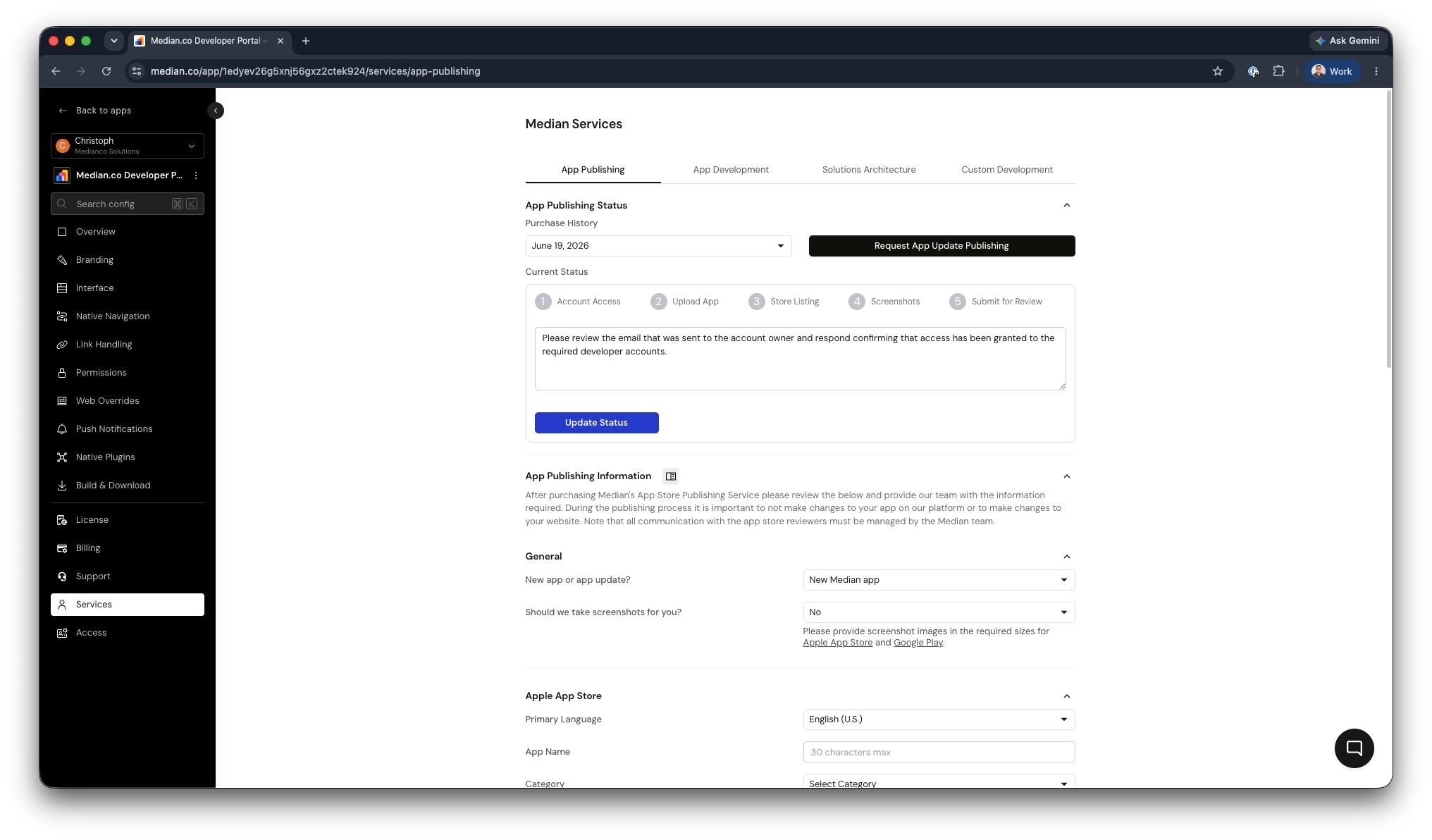
App Store Publishing Dashboard
Where to go next
| You want to... | Go to... |
|---|---|
| Convert a Lovable app | Lovable |
| Convert a Replit app | Replit |
| Convert a Base44 app | Base44 |
| Publish to the app stores | Publishing overview |
| Add in-app products & subscriptions | App Monetization |
| Grow your app after launch | App Marketing & Growth |
| Create a new app now | median.co/app |
Updated about 1 month ago