
JavaScript Bridge Overview
Learn how to use the Median JavaScript Bridge to control native app features and device hardware
The Median JavaScript Bridge is an API embedded in your app that lets your website control and configure the app and access native device functionality and hardware. Your web code can call the bridge to trigger native actions, read device info, manage navigation, and integrate with native plugins.
There are two ways to use the JavaScript Bridge: the JavaScript Bridge Library, which provides helper functions and an abstraction layer, or the Median Protocol (median://) for direct, lower-level access without the library.
Legacy GoNative NamespaceFor existing apps that were last updated on the GoNative.io platform you must use
gonativerather thanmedian. For examplegonative.statusbar.set()orgonative://statusbar/set.For apps that have been updated on Median.co you may use either
gonativeormedian.
Related Documentation
Detecting App Usage
Detect when your website is running inside the Median app so you can adapt UI, analytics, or behavior for the in-app experience.
NPM Package
Use the median-js-bridge NPM package in React, Vue, or other frameworks. Basic usage, listeners, and SPA navigation support.
Device Info
Retrieve device information such as platform, OS version, and app version from the JavaScript Bridge.
Clipboard
Read from and write to the device clipboard via the JavaScript Bridge.
Prompt Share Dialogue
Trigger the native share sheet to share URLs or content from your web app.
App Resumed Callback
Run code when the user returns to your app from the background. Handle app resume events from your web code.
Keyboard State Tracking
Track when the device keyboard is shown or hidden and respond to keyboard state changes.
Download File
Download files from your web app to the device using the native download manager.
Clear Webview Cache
Clear the app webview cache programmatically from your web code.
Accessing callbacks in an iframe
Use JavaScript Bridge callbacks when your content runs inside an iframe. Expose functions and handle cross-frame communication.
JavaScript Bridge Library
The JavaScript Bridge Library is injected into your webpage DOM at runtime and is available on any page displayed in the app. You can call median.module.function() once the library is ready.
Developer DemoDisplay our demo page in your app to test during development https://median.dev/library-ready/
When using frameworks like React, Vue, or Angular, the median object may not be in scope. Options:
- Expose callbacks globally:
window.callback_function = () => {} - Use the NPM Package and toggle off library injection in App Studio → Website Overrides
- Use the Median Protocol (
median://) which does not require the library
Mediannotmedianwhen using NPM packageWhen using the NPM Package make note to use capitalized
Medianto call functions rather than lowercasemedianwhich is reserved for the the injected JavaScript library. Your IDE should be configured to help with code hinting to help with completion and avoid semantic errors.
Calling Commands on Page Load
The library is not available until it initializes. For commands that must run on page load, define median_library_ready() on your page; it is called after initialization. Or use the Median Protocol so you are not dependent on the library.
If median_library_ready() is not called (e.g. the library initializes before your page defines it), call it manually when the library is ready:
function median_library_ready() {
  // Your code here
}
if (window.median) {
  window.median_library_ready();
}
Promises
Some bridge commands return JavaScript promises. Handle them with async/await or .then()/.catch() :
median.iap.purchase({ productID: 'product_id' })
  .then(function(data) { /* handle success */ })
  .catch(function(error) { /* handle error */ });
Median Protocol
You can call bridge commands via the median:// protocol without the JavaScript Bridge Library. Use an HTML anchor href for simple commands, or set window.location.href in JavaScript for complex ones. Parameters with JSON or special characters must be encoded with encodeURIComponent().
To chain multiple commands, use median://nativebridge/multi with an array of URLs instead of making sequential calls (which can cause only the last command to run).
Restricting Bridge Access by URL
By default, the Median JavaScript Bridge is available on every page loaded in your app. You can restrict Bridge access to specific URL paths in App Studio using the Allowed URLs field.
When URLs are specified, only matching pages can execute JavaScript Bridge commands or access native device functionality. All other pages have Bridge access disabled.
Important Considerations
-
App Store updates: Changes to Allowed URLs require a new app version. Users must install the updated version from the Apple App Store or Google Play Store for the changes to take effect.
-
Testing: Because non-matching pages cannot access the Bridge, an incorrect configuration can cause Bridge commands to stop working during development. We recommend leaving Allowed URLs empty during development and enabling restrictions when preparing your production app.
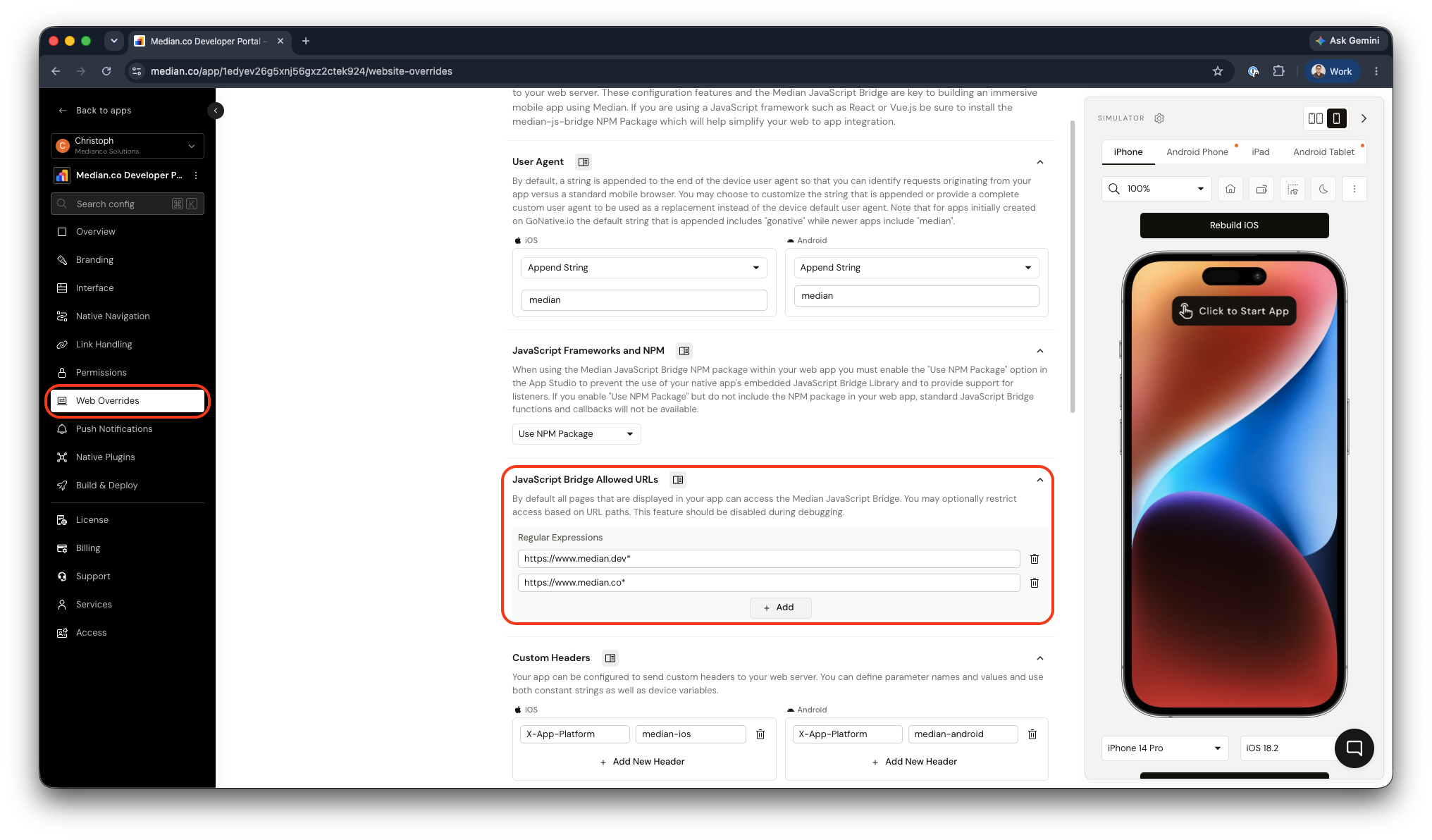
Median App Studio - Restricting Bridge Access
Frequently Asked Questions
Why do I see 'median is not defined' in the console?
Why do I see 'median is not defined' in the console?
The library is injected at runtime by the app and is not available in a desktop browser. Use the NPM Package if you need to develop or test outside the app, and disable library injection in App Studio → Website Overrides when using the package.
Updated about 1 month ago