
Intent Edge
Unlock Intent Edge Analytics and generate user insights
The Intent Edge Plugin integrates the native iOS and Android Intent Edge SDKs into your app to enable analytics, logging, and debugging. It also extends the Median JavaScript bridge to support micro-segmentation, event tracking, campaign triggers, data enrichment, and SDK lifecycle management.
This guide provides step-by-step instructions to configure the plugin and use its features through the Median JavaScript Bridge.
Developer DemoTest your setup during development by embedding the Intent Edge Demo page in your app.
Implementation Guide
Plugin Configuration
The Intent Edge Native Plugin requires you to provide a valid API key (provisioned by Intent HQ based on your App Identifiers) and offers several configuration options accessible via Native Plugins > Intent Edge.
- API Key - The API key for your app(s) will be available provisioned by Intent HQ based on your Android Package Name and iOS Bundle ID of your app. You can learn more about the package name and the bundle ID in our App Identifiers article.
- Audience Analytics - Enables/disables Audience Analytics during the SDK startup. Audience Analytics is a service that enables marketers to receive an anonymized report with insights about the users, aggregated together for analytics purposes.
- Crash Reports - Enables/disables the generation of Crash Reports during the SDK startup. Intent Edge reports crashes to Bugsnag applications stability monitoring system. These crashes are available to Intent Edge for monitoring and analysis.
- Debug Logging - Enables/disables Debug Logging during the SDK startup. The debug screen is a capability you can add to the app at the testing stages.
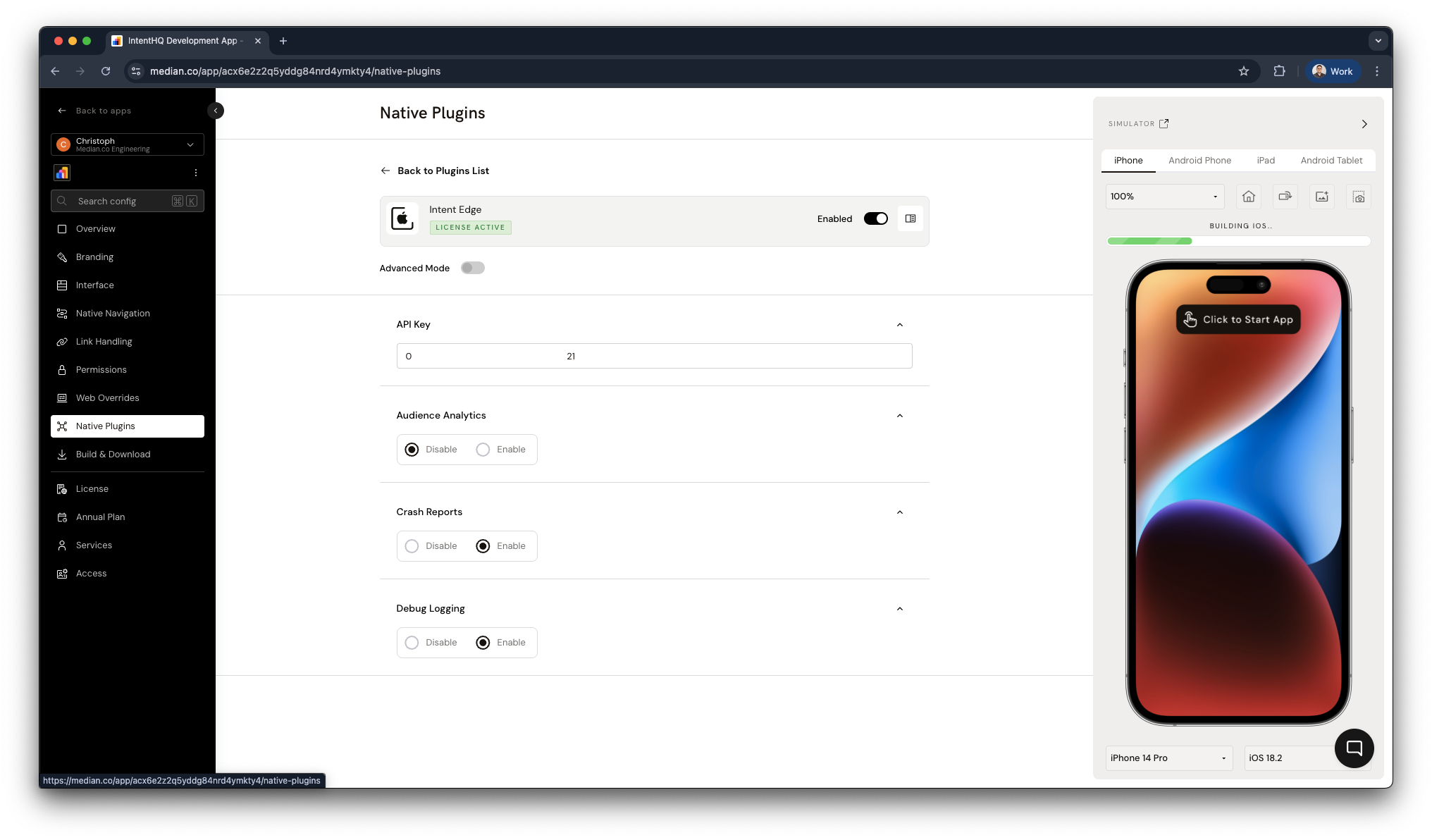
Intent Edge Plugin Configuration
JavaScript Bridge Functions
SDK Lifecycle Methods
NoteThe SDK lifecycle methods are only used to stop the SDK (and potentially purge the SDK data). The SDK is started by default when the app opens.
The SDK can be restarted if necessary using the JavaScript Bridge methods. You can specify whether you want to purge the SDK data by using the true | false flag in the intentedge.stop() method.
true- Purge SDK datafalse- Keep SDK data
// Start the SDK
median.intentedge.start();

// Stop the SDK
median.intentedge.stop(true | false);
Debugging
Intent Edge provides a prebuilt Debug Screen that allows you to access debugging capabilities or share logs with Intent HQ for further debugging.
// Launch the Debug Screen
median.intentedge.launchDebugScreen();

// Export the Debug Logs
median.intentedge.exportLogs();
Micro-Segments
Custom Micro-Segments allow you to use your own Micro-Segments in Intent Edge. You can use the methods below to create custom micro segments that can be used along with all the Micro-Segments provided by Intent Edge.
// Set Micro Segments
median.intentedge.microSegments.setInteger(name, parseInt(value) || 0); // Intger value, default to 0 if parsing integer is unsuccessful
median.intentedge.microSegments.setFloat(name, parseFloat(value) || 0); // Float value, default to 0 if parsing float is unsuccessful
median.intentedge.microSegments.setString(name, value); // String value

// Get Micro Segments
median.intentedge.microSegments.getInteger(name);
median.intentedge.microSegments.getFloat(name);
median.intentedge.microSegments.getString(name);
Page Visit Tracking
Report page visit of the current app user. The page name will appear in two places in the Intent Edge System:
- In the Analytics Dashboard.
- In the Page Visits micro-segment configuration page.
median.intentedge.pageTracker.enterPage("your-page-name");Page Events
Track user page events such as micro moments and user interactions.
Micro-Moments
Custom Micro-Moments allow you to use your own Micro-Moments in Intent Edge. You can invoke a Custom Micro-Moments using the function below.
// Track Micro-moment

const parameters = { app: "Your App Name", timestamp: Date.now() };
median.intentedge.events.fireMicromoment("your-event-name", parameters);
User Interactions
Update Intent Edge for any InteractionEvent.
// Track accepted clicks, notification clicks and conversions

median.intentedge.events.sendUserInteraction(
  "campaign ID",
  acceptedTrigger | notificationClick | conversion,
);
Onboarding Status
Intent Edge can track the end-user's onboarding status across the user journey in the application. The following functions allow you to start and complete the user onboarding.
// Launch the Debug Screen
median.intentedge.onboarding.start();

// Export the Debug Logs
median.intentedge.onboarding.complete();
Campaigns
Campaigns are triggered by conditions that have been set in the Intent Edge Console. You can configure additional campaign triggers and click handlers with the functions below.
// Campaign Trigger Handler
median.intentedge.campaigns.setCampaignTriggerHandler((data) => {
  window.alert(`Campaign triggered: ${JSON.stringify(data)}`);
});

// Campaign Click Handler
median.intentedge.campaigns.setCampaignClickHandler((data) => {
  window.alert(`Campaign clicked: ${JSON.stringify(data)}`);
});
Data Enrichment
Export a map of all the user segments.
median.intentedge.dataEnrichment.exportData();Updated about 1 month ago