
Localized Tab Menu
You can localize labels on Median's bottom Tab Menu using the Dynamic Tab Menu feature. This enables a multilingual user experience by adapting tab labels based on the user's device language settings.
The following implementation shows how to detect the user's language, apply a translation dictionary, and render the bottom tab bar in English, French, Spanish, German, or Italian.
Implementation Guide
Developer DemoDisplay our demo page in your app to test during development https://median.dev/tab-bar-navigation/localized-nav
JavaScript Implementation
↔️Median JavaScript Bridge
// Get the user's language
let userLanguage = navigator.language || navigator.userLanguage;
let languageCode = userLanguage.split("-")[0];

// Function to localize the tab items
function localizeTabItems(tabItems) {
  // Define translations for the labels
  const translations = {
    en: {
      "Tab 1": "Tab 1",
      "Tab 2": "Tab 2",
      "Tab 3": "Tab 3",
    },
    fr: {
      "Tab 1": "Onglet 1",
      "Tab 2": "Onglet 2",
      "Tab 3": "Onglet 3",
    },
    es: {
      "Tab 1": "Pestaña 1",
      "Tab 2": "Pestaña 2",
      "Tab 3": "Pestaña 3",
    },
    de: {
      "Tab 1": "Register 1",
      "Tab 2": "Register 2",
      "Tab 3": "Register 3",
    },
    it: {
      "Tab 1": "Scheda 1",
      "Tab 2": "Scheda 2",
      "Tab 3": "Scheda 3",
    },
  };

  // Get the user's language
  const userLanguage = navigator.language || navigator.userLanguage;
  const languageCode = userLanguage.split("-")[0];

  // Check if the translations exist for the user's language
  const userTranslations = translations[languageCode] || translations["en"];

  // Update the labels in the tabItems array
  return tabItems.map((item) => ({
    ...item,
    label: userTranslations[item.label] || item.label,
  }));
}

const tabItems = [
  {
    icon: "fas fa-cloud",
    label: "Tab 1",
    url: "javascript:alert('You selected tab 1')",
  },
  {
    icon: "fas fa-globe",
    label: "Tab 2",
    url: "javascript:alert('You selected tab 2')",
  },
  {
    icon: "fas fa-users",
    label: "Tab 3",
    url: "javascript:alert('You selected tab 3')",
  },
];

// Localize tab bar items
const localizedTabItems = localizeTabItems(tabItems);

// Render bottom tab bar
function median_library_ready() {
  median.tabNavigation.setTabs({ enabled: true, items: localizedTabItems });
}
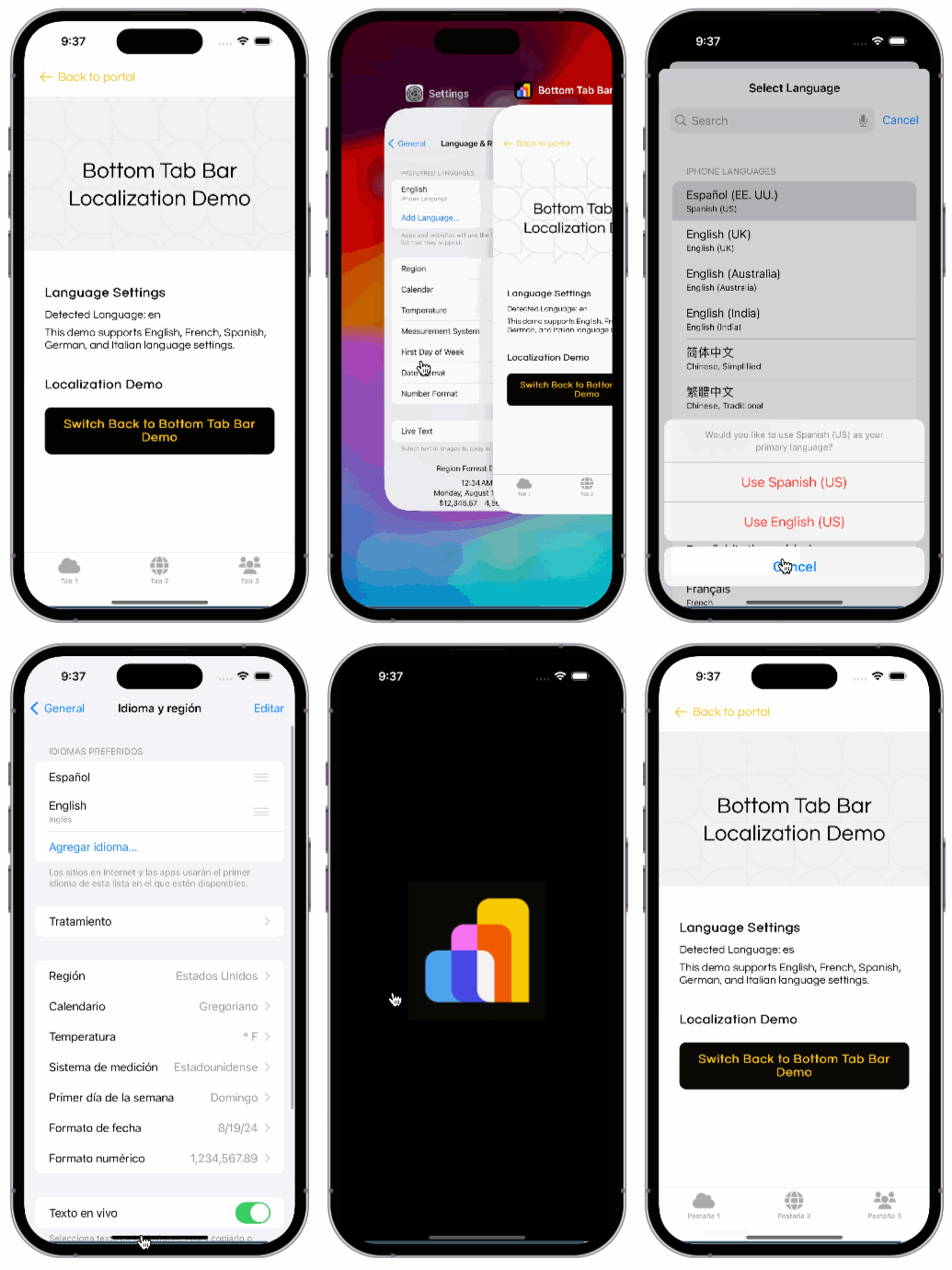
Tab Bar Localization Demo
This animated demo shows how the tab labels dynamically change when the user's device language is changed from English to Spanish.
Bottom Tab Bar Localization Demo